# Connect bank accounts with the Plaid pipe
> Let app users link a bank account through Plaid Link, then read their accounts, balances, identity and transactions with the Plaid pipe.
Source: https://tadabase.com/docs/pipes/plaid-pipe
Status: Verified Nov 17, 2026. Checked against the current product
The Plaid pipe lets the people using your app connect a bank account through Plaid Link, Plaid's sign-in window. Your app then keeps an access token for that account and uses it to read accounts, balances, identity, income and transactions.
> **Plan requirement:** Opening Plaid Link needs JavaScript on a page that runs pipe calls from the browser. That only works when your plan allows JavaScript in pipes: the **Copy Code** button on a call's **Overview** tab shows only on those plans, and the live app refuses the call otherwise.
## Get your Plaid keys
1. **Open the Plaid Dashboard** Sign in at [dashboard.plaid.com](https://dashboard.plaid.com) and open the API keys page.
2. **Copy the keys** Copy your `client_id` and the secret for the environment you will use. Use **Sandbox** while you build and test; Plaid gives you **Production** access after it approves your account.
> **Warning:** The pipe's help text still mentions a `development` environment. Plaid has retired that environment, so use `sandbox` or `production`.
## Install and set up the pipe
1. **Open Pipes** In the builder, click the **Pipes** icon in the left menu. The **All Pipes** page lists every pipe you can install.
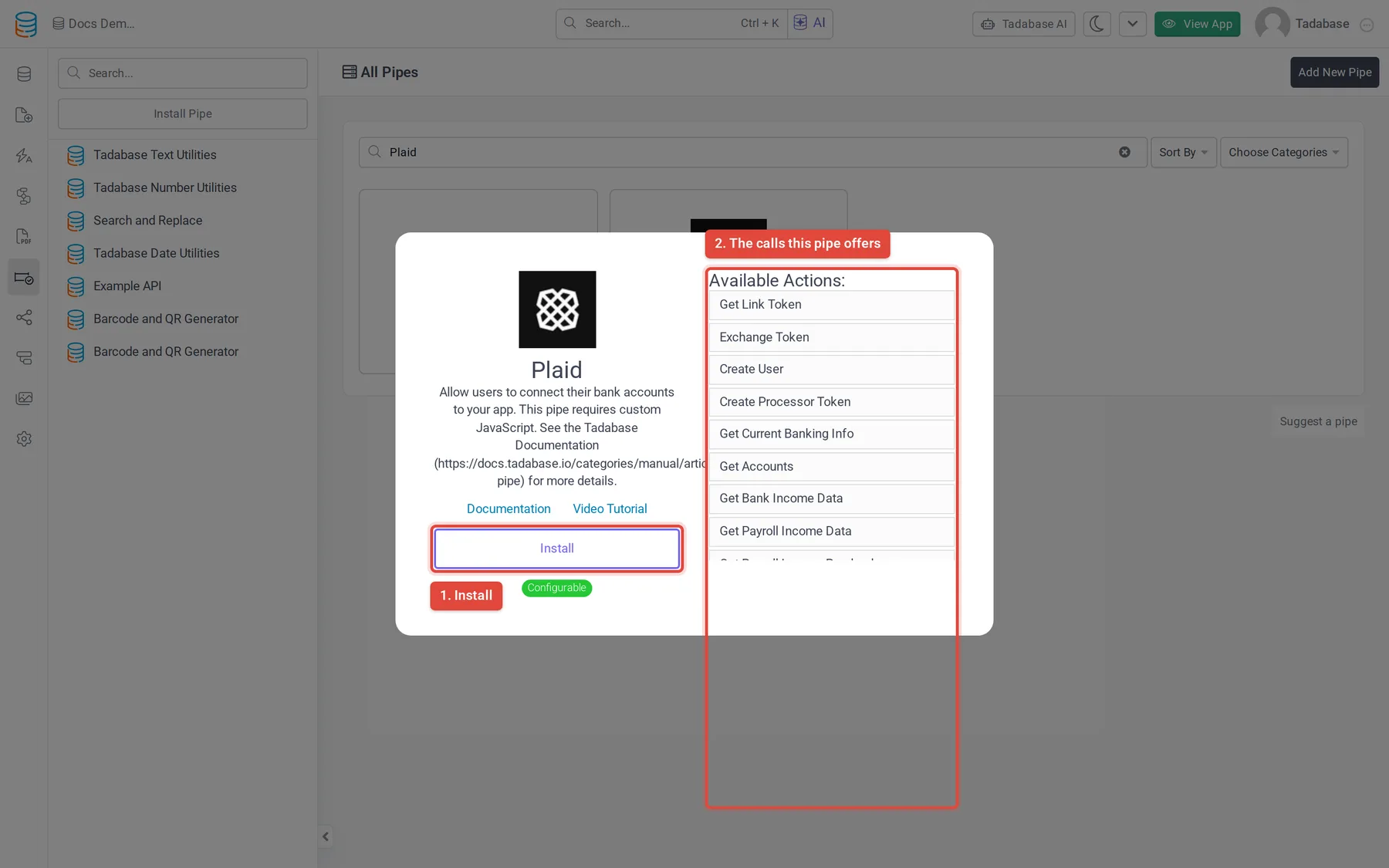
2. **Find the pipe** Type `Plaid` in the **Search...** box and click the **Plaid** card. The window shows what the pipe does and its **Available Actions**: the calls it offers.
3. **Click Install** Click **Install**. If your plan does not include pipes, an upgrade button shows instead.
4. **Open Global Parameters** The pipe asks for nothing during install. Open the installed Plaid pipe and click **Global Parameters**.
5. **Enter your keys** Set **Client ID** to your `client_id`, **Development Secret** to the secret for your environment, and **Environment** to `sandbox` or `production` (it starts as `sandbox`). Click **Save**.
Every call sends the client ID and secret to `https://{Environment}.plaid.com` from the Tadabase server, so they are not exposed to the browser.
## Let users link a bank account
Linking takes three calls in order: create a link token, open Plaid Link with it, then exchange the public token Plaid Link returns for a permanent access token.
1. **Add fields to the Users table** Add text fields for the Plaid access token (and the Plaid user token if you use income calls). Keep these fields out of every page other users can see: the access token gives ongoing read access to the person's bank data.
2. **Load the Plaid Link library** Add `` to your app's custom header code. See [Custom header and footer code](https://tadabase.com/docs/settings/custom-header-footer-code).
3. **Add a button** On the page where users connect their bank, add an HTML element with a button, for example ``.
4. **Copy the Get Link Token code** Open the Plaid pipe, click **API Calls** > **Get Link Token** > **Overview**, and click **Copy Code**. Paste the code into the page's JavaScript (see [Page CSS and JavaScript](https://tadabase.com/docs/pages/page-css-javascript)).
5. **Fill in the parameters** Set `name` to your company name, `user_id` to a unique ID for the logged-in user (such as their record ID), and `products` to the Plaid products you use, each in double quotes, for example `"auth","transactions"`. Your Plaid account must have those products enabled.
6. **Open Plaid Link** In the call's callback, create the Plaid Link handler with `response.link_token` and open it when the button is clicked (see the example below).
7. **Exchange the public token** Copy the code of the **Exchange Token** call the same way and run it from Plaid Link's `onSuccess`, passing the `public_token`. Its response holds `access_token`.
8. **Store the access token** Save the access token to the logged-in user's record. One way is to run the **Update Existing Record** call of the **Tadabase Rest API** pipe from the same JavaScript.
```javascript
// Paste the ids from Copy Code in place of these placeholders.
var getLinkToken = 'PASTE_GET_LINK_TOKEN_ID';
var exchangeToken = 'PASTE_EXCHANGE_TOKEN_ID';
TB.triggerPipe(getLinkToken,
{name: 'My Company', user_id: 'USER_RECORD_ID', products: '"auth","transactions"'},
function (type, response) {
var handler = Plaid.create({
token: response.link_token,
onSuccess: function (public_token) {
TB.triggerPipe(exchangeToken, {public_token: public_token},
function (type, response) {
// response.access_token: save it to the user's record here.
});
}
});
$('#plaid-connect').on('click', function () { handler.open(); });
});
```
> **Warning:** Code from **Copy Code** logs each response to the browser console with `console.log`. Remove that line before you go live so access tokens are not written to the console.
To test in Sandbox, sign in to any bank in Plaid Link with the user name `user_good` and password `pass_good`.
## Calls in the pipe
After a user links an account, run these calls with their access token, for example from a workflow with the **Trigger Pipe** action. Calls for income, assets and employment need those Plaid products enabled on your Plaid account.
| Group | Call | Parameters |
| --- | --- | --- |
| Link | **Get Link Token** | Company Name, User ID, Products |
| Link | **Exchange Token** | Public Token ID |
| Accounts | **Get Accounts** | Access Token |
| Accounts | **Get Account Balance Data** | Access Token |
| Accounts | **Get Auth Data** | Access Token |
| Accounts | **Get Identity Data** | Access Token |
| Transactions | **Get Transaction Updates for an Item** | Access Token, Count |
| Assets | **Create an Asset Report** | Access Tokens, Days Requested |
| Assets | **Get an Asset Report** | Asset Report Token, Include Insights |
| Income | **Create User** | Client User ID (returns the User Token the income calls need) |
| Income | **Get Bank Income Data** | User Token |
| Income | **Get Payroll Income Data** | User Token |
| Income | **Get Payroll Income Precheck** | User Token and employer details |
| Income | **Get Employment Data** | User Token |
| Processors | **Create Processor Token** | Client User ID, Account ID, Access Token (the processor is set to `checkbook` in the request) |
## More from Plaid
For what each call returns, see the [Plaid API reference](https://plaid.com/docs/api/) and the [Plaid Link web guide](https://plaid.com/docs/link/web/).