# Change Labels Language
> Please note that this is now available as a plugin for easier installation. While you can use this document as a reference, the recommended method to add…
Source: https://tadabase.com/docs/snippets/change-labels-language
Status: Not yet re-checked. Moved from our previous help site and not yet re-checked against the current product. Last edited Sep 20, 2024.
> **Warning:** Please note that this is now available as a plugin for easier installation. While you can use this document as a reference, the recommended method to add this functionality is through the plugin installation wizard. Learn more about plugins [here](https://tadabase.com/docs).
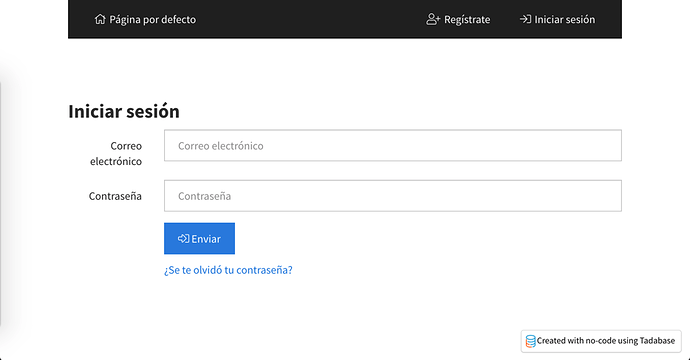
**To change the language of the login component. Add the following Code to the JavaScript tab of the login page.**
```
var emailLabel = 'Correo electrónico';
var passwordLabel = 'Contraseña';
var submitButtonText = 'Enviar';
var forgotPasswordText = '¿Se te olvidó tu contraseña?';
var sendVerificationCodeText = "Envíe el código de verificación";
var backText = "atrás";
$(function() {
var updateMainFields = function() {
$('.form-group:nth-child(2) > .col-sm-2').html(emailLabel);
$('.form-group:nth-child(3) > .col-sm-2').html(passwordLabel);
$('[ng-model="item.username"]').attr('placeholder', emailLabel);
$('[ng-model="item.password"]').attr('placeholder', passwordLabel);
$('[data-unique-id="page_1_4"].btn').html(" " + submitButtonText);
$('[ng-click="setFormMode(\'forgotPass\')"').html(forgotPasswordText);
};
var setOnClickEvent = function() {
$('[ng-click="setFormMode(\'forgotPass\')"').click(function() {
$('[ng-click="setFormMode(\'login\')"').click(function() {
updateMainFields();
setOnClickEvent();
});
$('[ng-model="item.email"]').attr('placeholder', emailLabel);
$('[ng-click="forgotPass()"]').html(' ' + sendVerificationCodeText);
$('[ng-click="setFormMode(\'login\')"').html(backText);
updateMainFields();
});
};
updateMainFields();
setOnClickEvent();
});
```

**To change the text for the confirm password for the profile component, you may use the following steps.**
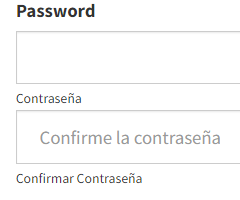
**First, find your component ID, as shown in the image below.**

**Then add the following code to the JavaScript section of the page.**
```
var textForPassword = "Contraseña";
var textForConfirmPassword = "Confirmar Contraseña";
var textForInputPlaceholder = "Confirme la contraseña";
TB.render('component_ID', function(data) {
$("#field_block_password > div > div > span:nth-child(1)").html(textForPassword);
$("#field_block_password input:nth-child(2)").attr("placeholder", textForInputPlaceholder);
$("#field_block_password > div > div > span:nth-child(3)").html(textForConfirmPassword);
});
```
> **Note:** Please update component_ID to your component ID, for example, component_4.

**You may use the following steps to change the Login, Sign Up, and Logout text for a User Menu Component.**
**Get the User Menu component ID.**

**Add the following code to the JavaScript section of your page.**
> **Note:** **Remember to change component_layout_ID to your component ID.**
```
TB.render('component_layout_ID', function(data) {
data.ele.find('.x-login-btn').html('Connexion');
data.ele.find('.x-signup-btn').html('Inscription');
data.ele.find("[ng-click=" + "'logout()'" + "]").html('Déconnexion');
});
```

**Original Community Post:**
[https://community.tadabase.io/t/changing-labels-language-that-dont-currently-have-settings-to-do-so/41/6](https://community.tadabase.io/t/changing-labels-language-that-dont-currently-have-settings-to-do-so/41/6)