# Change the Time Field to a Dropdown
> Please note that this is now available as a plugin for easier installation. While you can use this document as a reference, the recommended method to add…
Source: https://tadabase.com/docs/snippets/change-the-time-field-to-a-dropdown
Status: Not yet re-checked. Moved from our previous help site and not yet re-checked against the current product. Last edited Sep 20, 2024.
> **Warning:** Please note that this is now available as a plugin for easier installation. While you can use this document as a reference, the recommended method to add this functionality is through the plugin installation wizard. Learn more about plugins [here](https://tadabase.com/docs).
The time picker field comes with a particular style that often isn't as mobile friendly. To change the field to a simple dropdown you can use this snippet to do so.

### Header Code:
```
```
### Footer Code
```
```
### Get Component ID
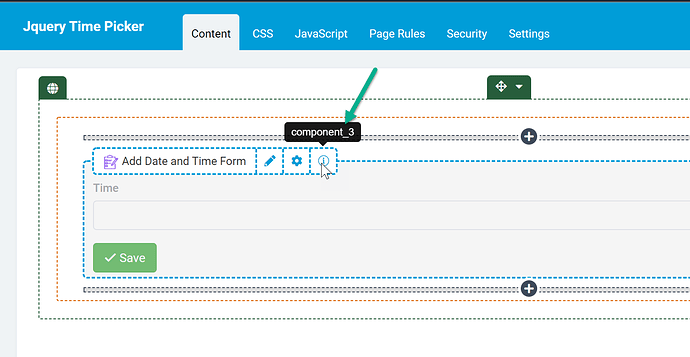
Next, find the component ID that has the Time field in it (in my case its component_3):
### Add Javascript Code:
```
//Be sure to change the component ID to your component id.
TB.render('component_3', function(data) {
$('.t-form-time input').timepicker({ 'timeFormat': 'h:i A' });
});
```
### Additional Options
There are many customizable options that can be configured to your specificity. Please see this link for all configuration options. [https://www.jonthornton.com/jquery-timepicker/](https://www.jonthornton.com/jquery-timepicker/)
**Example 1 - min and max times**
In the example below the earliest times that can be selected will be 2PM and latest 1130PM.
```
//Be sure to change the component ID to your component id.
TB.render('component_3', function(data) {
$('.t-form-time input').timepicker({
'timeFormat': 'h:i A',
'minTime': '2:00pm',
'maxTime': '11:30pm'
});
});
```
### Original Community Post:
[https://community.tadabase.io/t/change-time-field-format-for-mobile/901](https://community.tadabase.io/t/change-time-field-format-for-mobile/901)