
Contextual and Inline Help Throughout Builder
Product update · Aug 19, 2025
What's New
Extensive contextual and inline help has been added throughout the builder, providing tailored guidance that references your existing app and subscription details.
Context-Aware Assistance #
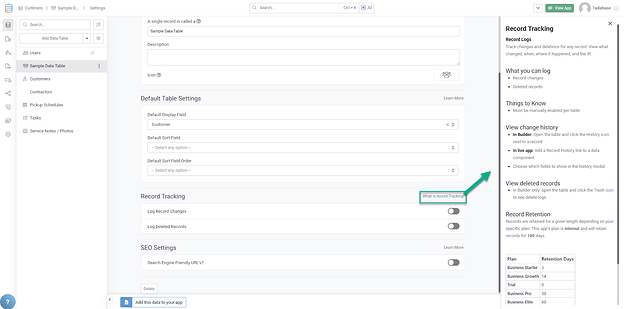
Help appears where you need it, when you need it:
- Inline Guidance: Help text appears directly in the builder interface
- Contextual Tips: Relevant advice based on what you're currently doing
- Tooltips and Explanations: Quick explanations for builder features
- Learn Without Leaving: Get answers without switching to documentation
Personalized to Your App #
The help system references your specific app and subscription:
- Aware of your subscription plan features
- Understands your app structure
- Provides relevant suggestions based on your setup
- Tailored answers instead of generic documentation
Enhanced Help Sidebar #
The help sidebar has been improved with better organization:
- AI Prompts Link: Quick access to AI Prompts documentation
- Video Guides: Tutorial videos for common tasks
- Contact Support: Direct link to support in main help section
- File a Support Ticket: Easy ticket submission
- Removed Outdated Links: Cleaner, more focused help resources
New Fields Modal with Inline Help #
Creating new fields has been updated with helpful inline information:
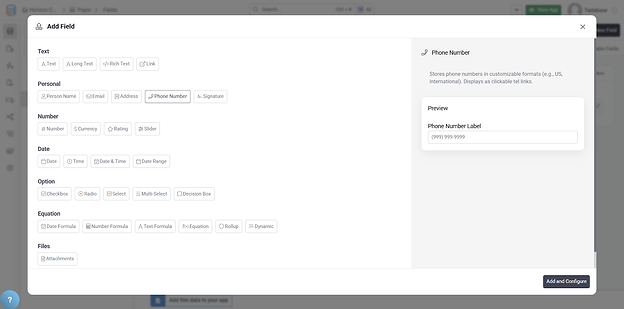
- Inline process for field creation
- Helpful popup with explanations
- Description of each field type
- Guidance on when to use each field
Help Throughout the Builder #
- Field Types: Explanations when choosing field types
- Component Settings: Tooltips for component configuration options
- Rules and Actions: Guidance on rule conditions and actions
- Page Builder: Help with layout and design options
- Data Builder: Tips for structuring your data model
Pro Tip
When learning a new feature, look for the help icons and hover tooltips throughout the builder. These often contain valuable tips and examples specific to your app.