
Field Slug Search & Universal Search Improvements
Product update · Aug 19, 2025
What's New
Added ability to search field slugs for easier navigation and management, with enhanced universal search (Ctrl+K) supporting slug-based field searching.
Search Fields by Slug #
Find fields quickly using their slug identifiers:
- Slug-Based Search: Search using internal field slugs (e.g., "field_123")
- Faster Navigation: Quickly locate specific fields
- Developer-Friendly: Useful when working with field IDs in formulas or APIs
- Easier Management: Manage fields more efficiently in large apps
Enhanced Universal Search (Ctrl+K) #
The universal search has been significantly enhanced:
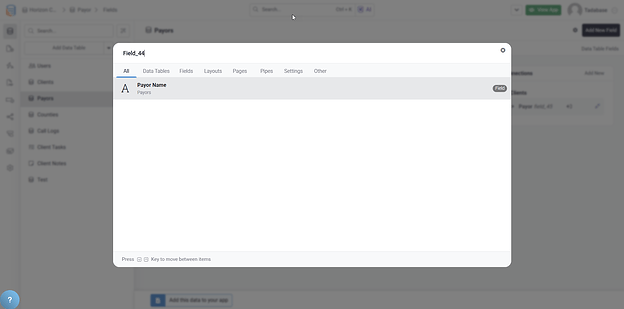
- Ctrl+K Shortcut: Quick access to universal search
- Field Search by Slug: Search fields using their slug identifiers
- Faster Navigation: Jump directly to fields, pages, tables, and more
- Comprehensive Coverage: Search across all builder elements
What You Can Search #
- Fields: By name or slug
- Tables: By name
- Pages: By page name
- Components: By component name
- Settings: Builder configuration options
- Features: Find specific builder features
Common Use Cases #
API Development #
When working with the Tadabase API:
- Quickly find field slugs for API calls
- Verify field IDs from API responses
- Navigate to fields mentioned in API documentation
Formula and Equation Building #
- Find field slugs when building equations
- Reference fields by their internal identifiers
- Verify you're using the correct field
Large App Management #
- Navigate complex apps with hundreds of fields
- Find specific fields without scrolling through lists
- Jump directly to field settings
Keyboard Shortcut #
Quick Access
Press Ctrl+K (Windows/Linux) or Cmd+K (Mac) anywhere in the builder to open universal search. Start typing a field name or slug to find what you need.