
Staged Restore and Backup Improvements
Product update · Dec 22, 2025
Major New Feature
Staged Restore provides safe, controlled access to archived app data without impacting your live production environment. Review historical data, verify backups, and export deleted records with zero risk.
Staged Restore Feature #
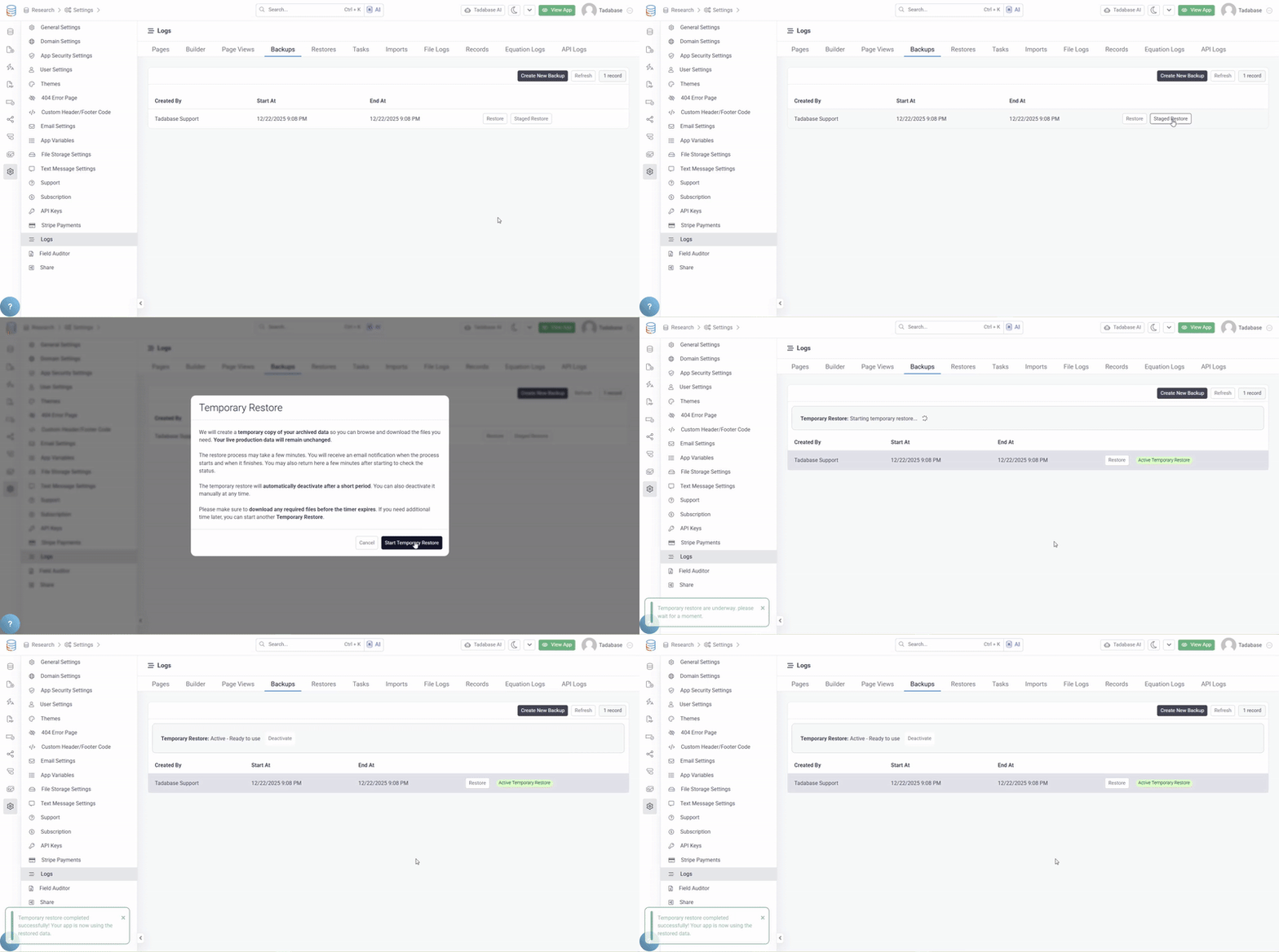
Staged Restore creates a fully functional copy of your archived app data that you can access and explore without affecting production:
How It Works #
- Create Staged Version: Select a backup and create a staged restore
- Background Preparation: Tadabase prepares the staged version (may take several minutes)
- Email Notifications: Receive notifications when preparation starts and completes
- Activate When Ready: Staged version remains inactive until you activate it
- Switch Environments: Toggle between live and restored versions instantly
- Review and Export: Browse data, run reports, export records
- Return to Live: Instant return to production environment
Zero Risk to Production #
- Live app remains completely unchanged
- Staged changes only apply to the staged restore
- No data overwriting unless explicitly exported
- Production users never see the staged version
Common Use Cases #
- Verify Backups: Confirm backups contain the expected data
- Review Historical Data: Look at how data appeared at a specific point in time
- Export Deleted Records: Recover accidentally deleted data by exporting from staged version
- Compare Versions: See what changed between backup and current state
- Safe Testing: Test potential restore impact before actually restoring
Additional Backup Improvements #
Trigger Custom Backups #
Manually initiate backups as needed:
- Create backups on-demand
- Don't wait for scheduled backups
- Backup before major changes
- Extra safety for critical operations
Restore Entire App #
Restore your entire app to a previous state:
- Complete app restoration
- All data, structure, and configuration
- Return to any backup point
- Recover from mistakes or issues
Staged Restore Workflow #
Typical Workflow
- Select the backup you want to review
- Click "Create Staged Restore"
- Wait for preparation email notification
- Activate the staged version
- Review data, run reports, export records as needed
- Deactivate when done and return to live environment
- Delete staged version or keep for later reference
What You Can Do in Staged Mode #
- Browse all data as it appeared at backup time
- Run reports and analytics
- Export records to CSV/Excel
- Download files and attachments
- View relationships and connections
- Search and filter data
- Everything is fully functional for review
What Changes Don't Affect Production #
Any changes made while in staged mode only affect the staged version:
- Record edits
- Deletions
- New records
- Configuration changes
These changes are isolated and do not impact your live app unless you explicitly export and import them.
Availability #
Staged Restore is available on Elite level plans and higher. Check with Tadabase support to confirm this feature is enabled for your account.
Pro Tip
Before performing a standard restore (which is destructive), always create a staged restore first. This lets you verify the backup contains what you need and preview the data before committing to the restore.