
Read app logs through the API
Pull your app's logins, page views, emails, sessions, record changes, webhooks, backups and other logs into your own tools, 50 entries at a time.
- Verified Nov 17, 2026
- Classic builder
The Logs API returns the same logs you see in the builder, so you can feed them into a security dashboard, an audit archive or an alert. Every log endpoint is read-only.
Before you start #
- Your plan must include API access and logs through the API (the Allow Logs switch shows a plan icon when it does not).
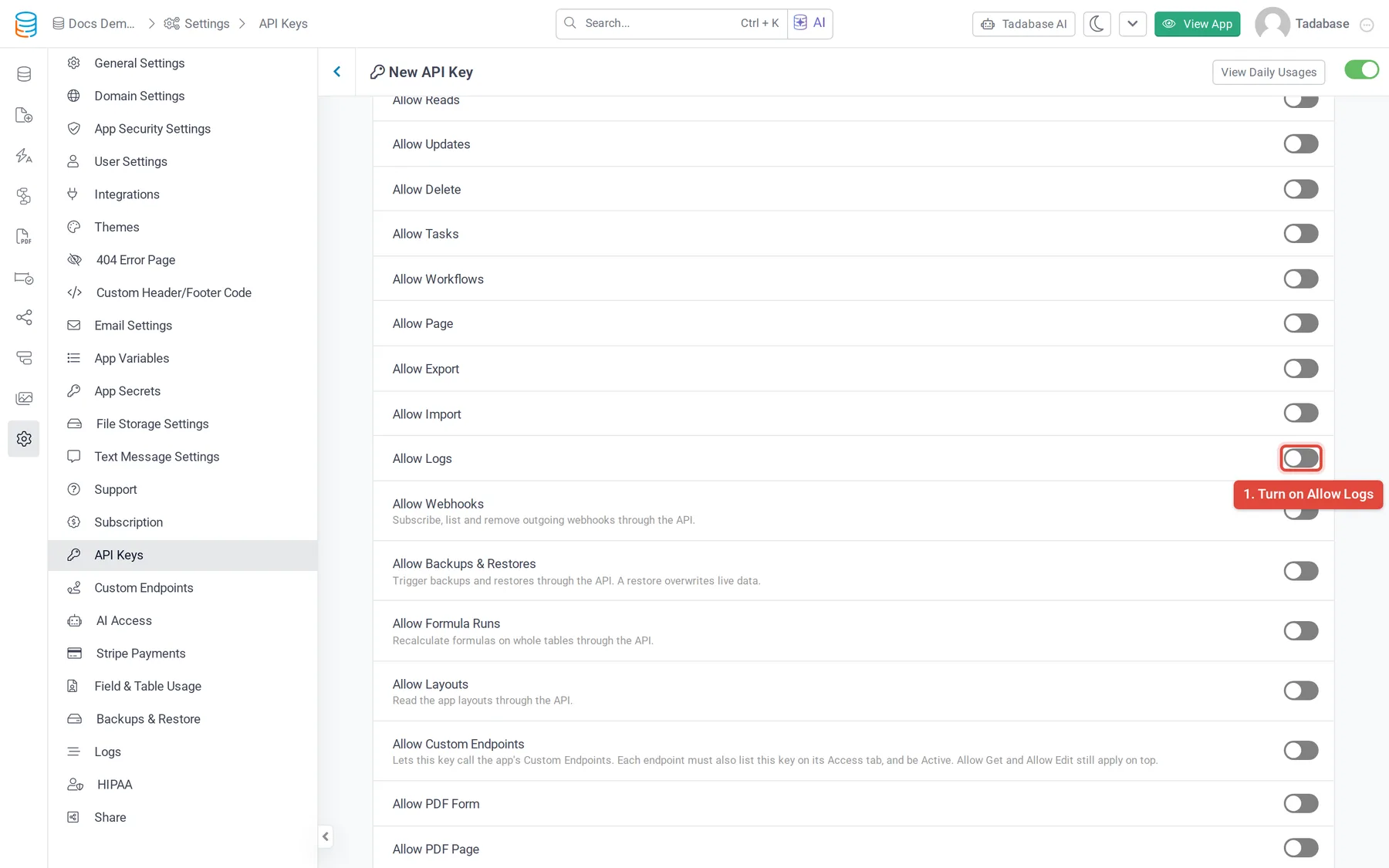
- Turn on Allow Logs on the API key in Settings > API Keys. Without it, calls answer
412with "The method being used is disabled for this API key." - Every URL starts with
https://api.tadabase.io/api/v1/logs/.
Pages of results #
Every log endpoint returns 50 entries per call, newest first. Add ?page=2, ?page=3 and so on for older entries. The page size cannot be changed and there is no date filter: to collect everything since your last run, read pages until you reach an entry you already have.
{
  "total_items": 1240,
  "page": 1,
  "total_pages": 25,
  "items": [ ... ],
  "type": "success"
}
If a log store is briefly unreachable, the answer is type: error with "Logs are temporarily unavailable. Please try again in a few minutes." Retry later.
The log endpoints #
| Endpoint | What it returns | Properties of each entry |
|---|---|---|
logs/ | Successful app user logins | email, name, type, created_at, ip, address, address2, city, state, country, zip, latitude, longitude, platform, browser, device, device_type |
logs/ | Failed login attempts | created_at, username, ip, city, state, country, platform, browser, device, device_type |
logs/ | App user sessions started in the last 13 hours that have not expired | email, name, created_at, expire_at, last_active_at, browser, ip |
logs/ | Blocked app users | type, created_at, username, start_at, end_at, status |
logs/ | Blocked IP addresses | type, created_at, username, start_at, end_at, status |
logs/ | Pages viewed in the live app | url, page_id, created_at, ip, browser, app_user_id, user (name and email, or "Not Logged in") |
logs/ | Emails the app sent | unique_id, created_at, to, subject, status, body, from_email, from_name, browser, ip |
logs/ | Changes made in the builder | type, created_at, ip, user (name, email), metas (a list of name and val) |
logs/ | Record changes | id, created_at, data_table_id, record_id, ip, url, method, source, source2, duration |
logs/ | Deleted records | id, created_at, data_table_id, record_id, ip, url, method, source, source2, duration |
logs/ | Imports | id, name, import_template_id, metas, created_at, created_by |
logs/ | Outgoing webhook calls | id, created_at, webhook_id, data_table_id, record_id, target_url, error, status |
logs/ | Files uploaded to the app | id, url, size, type, created_at, created_by, data_table_id, record_id, field_id, status, deleted_by, file_name, ext, secured, disk |
logs/ | Opens of secured files | id, created_at, created_by, source, file_upload_id, record_id, data_table_id, field_id, field_slug, page_id, url, ip, region, city, country, timezone, browser, platform, device_type, device |
logs/ | App backups | backup_id, created_at, start_at, end_at, status, origin, total_tables, file_size_bytes, total_backup_time, backup_type, s3_path, created_by (name, email, or "System") |
logs/ | Restores from a backup | restore_id, backup_id, created_at, start_at, end_at, status, origin, restore_type, total_tables, file_size_bytes, total_time, s3_path, created_by |
logs/ | Calls made to the API | id, created_at, app_key_id, duration (seconds), ip, url, method |
logs/ | API calls per key per day | id, date, api_key_id, total_request, last_used_date, created_at |
Backup and restore times are shown in the app's time zone.
Filters #
A few endpoints take query parameters to narrow the list. Use the values exactly as these logs return them.
| Endpoint | Query parameters |
|---|---|
logs/, logs/ | data_table_id, record_id, source |
logs/ | webhook_id, data_table_id, record_id, status |
logs/ | record_id, field_id, file_upload_id, data_table_id, source |
logs/ | method (for example GET or POST) |
logs/ | date, api_key_id |
curl "https://api.tadabase.io/api/v1/logs/webhook-logs?status=error&page=1" \
  -H "X-Tadabase-App-Id: YOUR_APP_ID" \
  -H "X-Tadabase-App-Key: YOUR_API_KEY" \
  -H "X-Tadabase-App-Secret: YOUR_API_SECRET"
Keep the key safe #
Logs hold email addresses, IP addresses, email bodies and locations. Give Allow Logs only to a key that needs it, keep that key on your server, and store what you collect as carefully as the app's own data. Each log call also counts toward your API rate limits (see Rate limiting).
Was this page helpful?
Something wrong or missing on this page? Tell us.