
Post record updates to a Slack channel
Send a Slack message when a record is created or updated: a workflow's Trigger Webhook action calls a short Apps Script that posts to Slack.
- Verified Nov 17, 2026
- Classic builder
On this page
Post a message to a Slack channel when something happens in your app, for example when a job is created. A workflow sends the record to a small Google Apps Script with the Trigger Webhook action, and the script turns it into a Slack message.
1. Create a Slack incoming webhook #
- Create a Slack app Go to api.slack.com/apps and create an app in your workspace.
- Turn on incoming webhooks In the app's settings, open Incoming Webhooks and switch them on.
- Pick the channel Add a new webhook to the workspace and choose the channel the messages go to.
- Copy the URL Copy the webhook URL Slack shows. Anyone with it can post to the channel, so keep it private.
2. Create the script #
- Create a project Go to script.google.com, create a project and paste the script below.
- Store the secrets In Project Settings > Script Properties, add
SLACK_WEBHOOK_URL(the URL from Slack) andSHARED_SECRET(a long random string of your choice). - Set your field slugs Replace
field_36andfield_48with the slugs of the fields to show in the message. See List all tables and field slugs in Google Sheets. - Deploy it as a web app Choose Deploy > New deployment, select the Web app type, run it as yourself and give access to Anyone. Copy the web app URL.
// Turns a record sent by a Tadabase Trigger Webhook action into a Slack message.
// Script Properties: SLACK_WEBHOOK_URL, SHARED_SECRET

var TITLE_FIELD = 'field_36';   // replace with your field slugs
var STATUS_FIELD = 'field_48';

function doPost(e) {
  var props = PropertiesService.getScriptProperties();
  if (!e.parameter.key || e.parameter.key !== props.getProperty('SHARED_SECRET')) {
    return ContentService.createTextOutput('forbidden');
  }

  // The Trigger Webhook action sends JSON: the record's values are under "record".
  var payload = JSON.parse(e.postData.contents);
  var record = payload.record || {};

  var text = '*New ' + payload.table_name + ' record*\n' +
    'Title: ' + (record[TITLE_FIELD] || '') + '\n' +
    'Status: ' + (record[STATUS_FIELD] || '');

  UrlFetchApp.fetch(props.getProperty('SLACK_WEBHOOK_URL'), {
    method: 'post',
    contentType: 'application/json',
    payload: JSON.stringify({ text: text })
  });
  return ContentService.createTextOutput('ok');
}
3. Send records from a workflow #
- Create the workflow Create a workflow on the table to watch, with the Record Created, Record Updated or Record Created or Updated trigger. See Create your first workflow.
- Add the action Click Add Step > Add Action and choose Trigger Webhook (Send record data to an external endpoint).
- Set the URL In Webhook URL, paste the web app URL followed by
?key=and your shared secret. - Choose the record Leave Use record from on Source Record to send the record that started the workflow.
- Save Save the workflow.
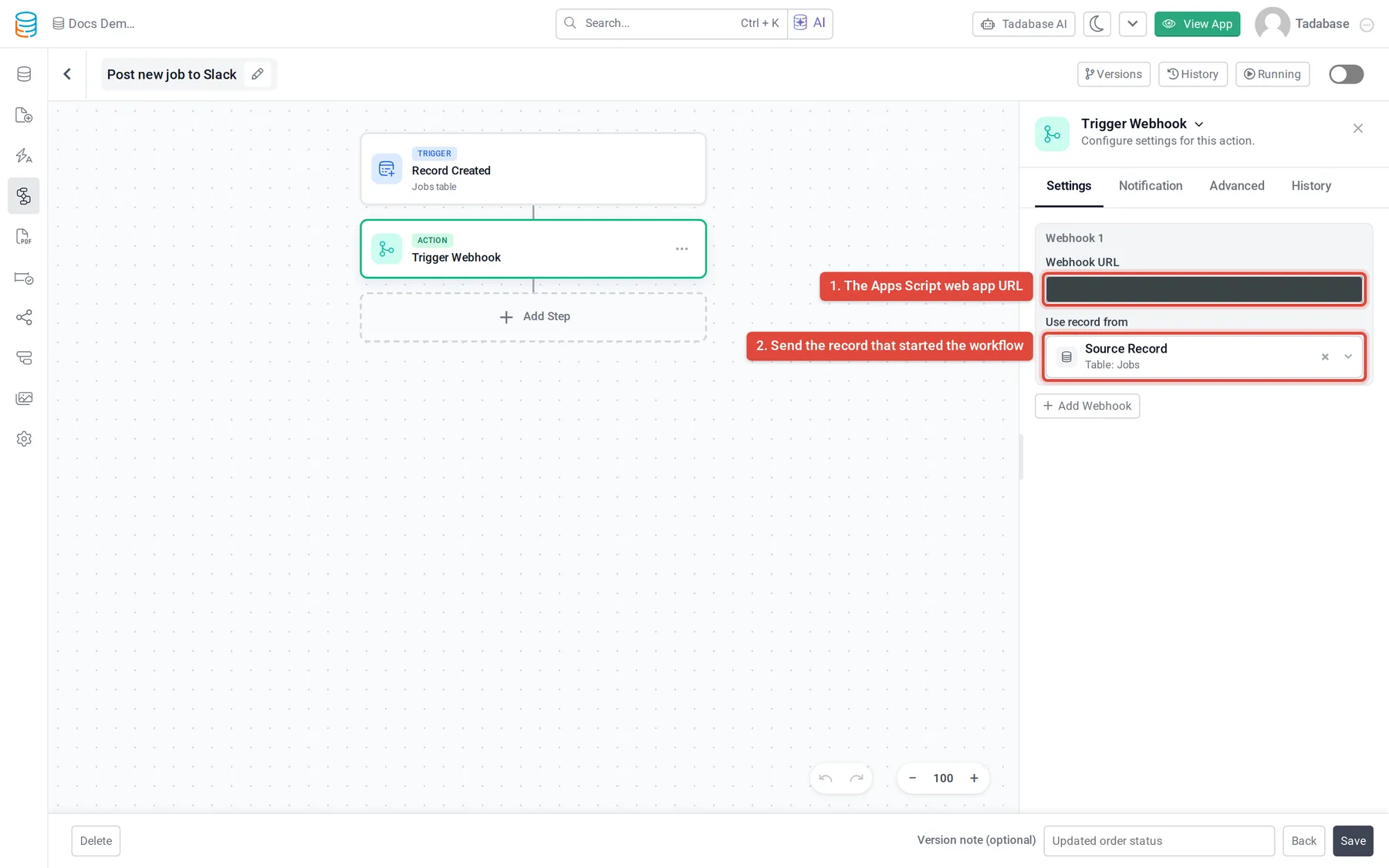
To post only some records, for example jobs marked urgent, add a condition before the Trigger Webhook step. See Conditions and branches.
4. Test it #
- Create a record in the table. A message should appear in the Slack channel within a few seconds.
- If no message appears, open the workflow's run history and select the Trigger Webhook step. It shows the URL, the record that was sent and the status code. The record's values are keyed by field slug, so you can check the slugs your script reads. See Workflow history and logs.
- In the Apps Script editor, Executions lists each call of
doPostand any error. - If the step reports
Webhook responded with status 302.but the message arrived, the script ran: Google answers web app calls with a redirect, and the Trigger Webhook action does not follow redirects.
Good to know #
- One Trigger Webhook step can send to several URLs: click Add Webhook to add another.
- Use record from can also send a connected record or the result of an earlier step. For connected records, only the first 100 are sent.
- The webhook URL must be a public address. Requests time out after 15 seconds, so keep the script short.
- Trigger Webhook needs a plan that includes outgoing webhooks.
Was this page helpful?
Something wrong or missing on this page? Tell us.