
Call a pipe from JavaScript (PipeScripts)
Run a pipe API call from your page JavaScript with TB.triggerPipe: copy the snippet from the Pipescripts tab, pass parameters and handle the response.
- Verified Nov 17, 2026
- Classic builder
On this page
PipeScripts let your own JavaScript run a pipe's API call on the server and get the response back in the browser. Use them when a button, a calculation or a page event in your custom code needs data from another service, without putting that service's keys in the page.
Before you start #
- You need a pipe with at least one API call. See Adding Pipes.
- Your plan must include JavaScript in pipes. Without it, the Pipescripts tab is not shown and calls from JavaScript are refused.
- The Pipescripts tab is not shown on a private pipe, whose setup the publisher keeps hidden.
Copy the code for an API call #
- Open the pipe Click Pipes in the builder's left menu and open the pipe.
- Choose the API call Go to the API Calls tab and click the call you want to run.
- Open the Pipescripts tab Click Pipescripts. The editor shows the JavaScript for this call.
- Limit who can run it (optional) Under Logged in User Conditions, click Add New Condition and set the conditions the logged-in user must meet. With a condition set, only signed-in users who match can run the call; everyone else gets
Not Authorized. - Copy the code Click Copy Code. The same button is on the call's Overview tab.
- Paste it into your page Paste the code into the Javascript tab of the page or layout where it should run, and Save.
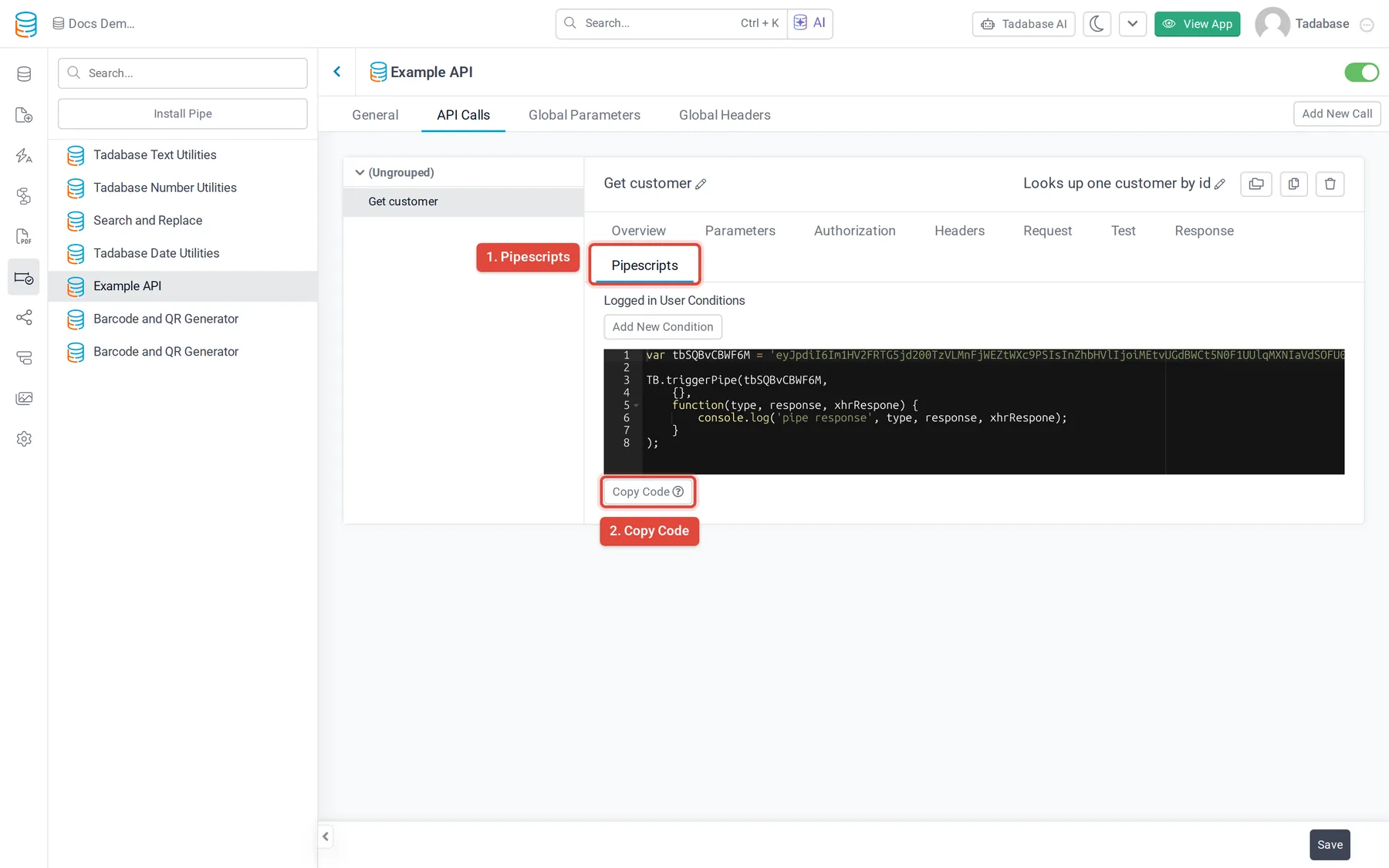
What the code looks like #
var tbAbc123 = 'eyJpdiI6...';

TB.triggerPipe(tbAbc123,
    {city: 'Boston', units: 'imperial'},
    function (type, response, xhrRespone) {
        console.log('pipe response', type, response, xhrRespone);
    }
);| Argument | What it is |
|---|---|
| First: the call ID | The value in the first line of the copied code. It names this pipe and this API call; copy it as it is. |
| Second: parameters | An object with one entry per parameter of the call, keyed by the parameter's slug (or its name if it has no slug), filled with its default value. Replace the values with your own. Parameters of type Logged In User Value are left out: the server fills them from the signed-in user. |
| Third: callback | Your function. It receives type (success or error), response (the JSON the call returned) and the raw request object. |
Call the pipe from your page #
Most often you run the call when something happens on the page, then put the result on the screen. This example runs a call when a Details component loads and shows the result in an alert.
var weatherCall = 'eyJpdiI6...'; // from Copy Code

TB.render('component_5', function (data) {
    TB.triggerPipe(weatherCall, {city: data.record.field_12}, function (type, response) {
        if (type !== 'success' || response.type === 'error') {
            TB.showAlert('Could not load the weather', 'error');
            return;
        }
        TB.showAlert('Weather loaded', 'success');
        console.log(response);
    });
});Limits #
- Each call runs the pipe on Tadabase's servers, the same as a pipe on a form or a workflow.
- Calls can be rate limited. When a limit is reached the callback gets
typeerrorand the request status is429; wait before you try again. - Don't call a pipe in a loop or on a timer that fires every few seconds. Call it once per user action and keep the result.
Was this page helpful?
Something wrong or missing on this page? Tell us.