
Read and save data through pages and components
Use the Pages API to list your app's pages and components, read the records a component shows, and submit a form component, with its rules applied.
- Verified Nov 17, 2026
- Classic builder
On this page
The Pages API reads and saves data through the components on your app's pages instead of straight from the tables. You get what the component shows, with the component's own settings applied, and a form submitted through the API runs the form's rules as if a user had submitted it.
When to use it #
- You want an outside tool to see exactly the records a table, list or details component shows, with its filters already applied.
- You want to save data through a form component so that its rules (validation, connected values, emails and so on) run.
- You want requests to act as a specific app user. Sign the user in with
auth/loginand send their token with each request, as described in Authentication methods.
To read or write any record in a table without going through a page, use the record endpoints instead (see Working with records).
Before you start #
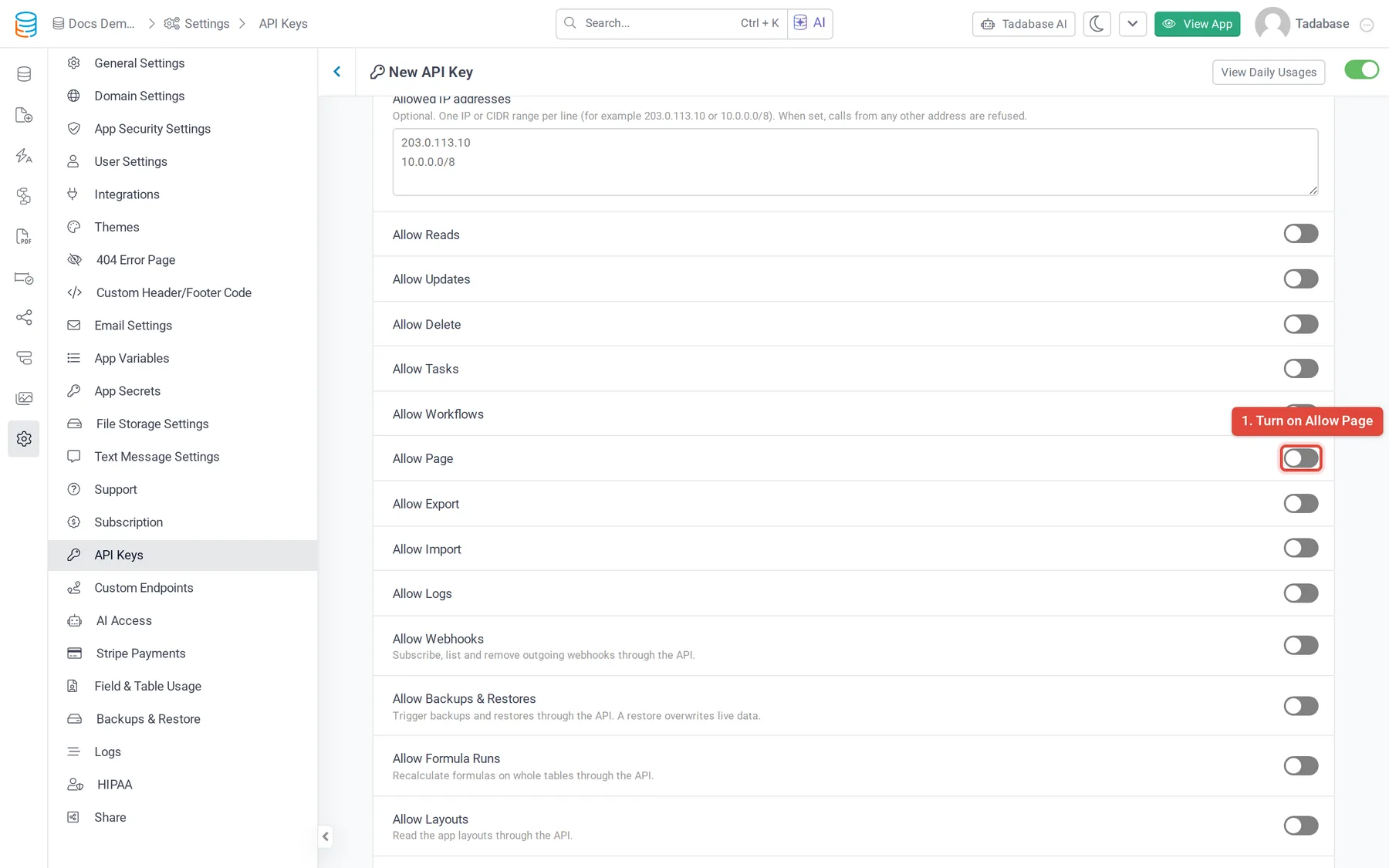
- Your plan must include API access and the Pages API (the Allow Page switch shows a plan icon when it does not).
- Turn on Allow Page on the API key in Settings > API Keys. Without it every Pages API call answers
412with "The method being used is disabled for this API key." - The Pages API is only on version 1.1 of the API. Every URL starts with
https://api.tadabase.io/api/v1.1/{appId}/, where{appId}is your App ID.
Endpoints #
| Method and path | What it does |
|---|---|
GET pages | Lists the top-level pages, 100 per page of results (?page=2 for the next) |
GET pages/{pageId}/childs | Lists the child pages of a page. Add more IDs to go deeper: pages/{pageId}/childs/{childId}/{grandchildId} |
GET pages/{pageId}/components | Lists the components on a page |
GET pages/{pageId}/components/{componentId}/records | Returns the records a component shows |
GET pages/{pageId}/components/{componentId}/details | Returns one record from a details component |
POST pages/{pageId}/components/{componentId}/save | Submits a form component |
GET layouts | Lists the app's layouts (needs Allow Layouts on the key, not Allow Page) |
Find a page and its components #
- List the pages Call
GET pages. Each page hasid,name,slug,status,layout_id,layout(with itsid,nameandis_secure),total_child_pagesandis_secure(1 when the page needs a login). - Go into child pages if you need to Call
GET pages/{pageId}/childsfor any page whosetotal_child_pagesis more than 0. - List the page's components Call
GET pages/{pageId}/components. Each component has anidsuch ascomponent_3, atype, and adataTableIdwhen it is tied to a table.
{
  "status": "success",
  "components": [
    { "id": "component_3", "type": "dataTable", "dataTableId": "lGArg7rmR6" },
    { "id": "component_5", "type": "form", "dataTableId": "lGArg7rmR6" }
  ]
}
Read the records a component shows #
GET pages/{pageId}/components/{componentId}/records works on components whose type is dataTable, list, kanban, accordion, timeline, custom or detail. Any other type answers "The component was not allowed."
The response has status, totalItems, items (the records) and fields (the name, slug and type of each field in the records). Connection field values come back as a list of id and value pairs.
{
  "status": "success",
  "totalItems": 1,
  "items": [
    {
      "id": "DVWQWRNZ49",
      "field_34": "Replace boiler",
      "field_36": [ { "id": "4MXQJdrZ6v", "value": "Dana Lee" } ]
    }
  ],
  "fields": [
    { "name": "Job Title", "slug": "field_34", "type": "Text" },
    { "name": "Assigned Technician", "slug": "field_36", "type": "Join" }
  ]
}
Read one record from a details component #
GET pages/{pageId}/components/{componentId}/details?recordId={recordId} works on detail components. When one record matches, the response has item; otherwise it has items. It also has fields, as above.
Submit a form component #
POST pages/{pageId}/components/{componentId}/save works on form components. Send the values as field slugs, the same way the form would send them.
curl -X POST https://api.tadabase.io/api/v1.1/YOUR_APP_ID/pages/PAGE_ID/components/component_5/save \
  -H "X-Tadabase-App-Id: YOUR_APP_ID" \
  -H "X-Tadabase-App-Key: YOUR_API_KEY" \
  -H "X-Tadabase-App-Secret: YOUR_API_SECRET" \
  -d "field_34=Replace boiler"
A form that adds records always creates a new record. A successful save answers with status: success, the form's message in msg when it has one, and recordId when a record was created. A failed save answers status: error with the reason in msg.
Common problems #
| Message | Cause |
|---|---|
| "The page was not found." | The page ID in childs is wrong or belongs to another app |
| "The component was not found." | The component ID is not on that page. Copy it from GET pages/{pageId}/components, including the component_ prefix |
| "The component was not allowed." | The endpoint does not work on that component type, for example save on a table component |
412 "The method being used is disabled for this API key." | Allow Page is off on the key |
Was this page helpful?
Something wrong or missing on this page? Tell us.