
Create connected records from a template with Apps Script
When a job is added, create its standard tasks from a template table: with a workflow loop, or with a Google Apps Script called by a webhook.
- Verified Nov 17, 2026
- Classic builder
Some records always come with a standard set of child records: every new job needs its checklist of tasks, every new survey its questions. This page shows how to copy those children from a template table each time a parent record is created.
The example #
A web agency runs several kinds of jobs. Each kind has its own standard tasks. The app has four tables:
| Table | Holds | Fields this example uses |
|---|---|---|
| Job Types | The kinds of job, such as New Website. | Name |
| Job Task List | The template: every standard task, connected to the job types it belongs to. | Task, Job Type (connection to Job Types) |
| Jobs | The real jobs. | Job Type (connection to Job Types) |
| Tasks | The real tasks of each job, created automatically. | Task, Job (connection to Jobs), Status |
Goal: when a job is created, find every task in Job Task List with the same job type, and create a matching task in Tasks, connected to the new job.
Do it with a workflow #
- Create the workflow Create a workflow on the Jobs table with the Record Created trigger. See Create your first workflow.
- Add a loop Click Add Step and choose Loop / Bulk Action (Run nested steps on every matching record).
- Choose the template records In Records from, pick the Job Task List table under All Tables. Add a filter so the loop keeps only the template tasks whose Job Type is the new job's Job Type.
- Create a task for each one Click Add action inside loop and choose Create Record on the Tasks table. Set Task to the Task value of the loop's current item (
currentItem), and set Job to the job that started the workflow. See Data actions. - Save and test Save the workflow, add a job, and check that its tasks appear. The run history shows each pass of the loop; see Workflow history and logs.
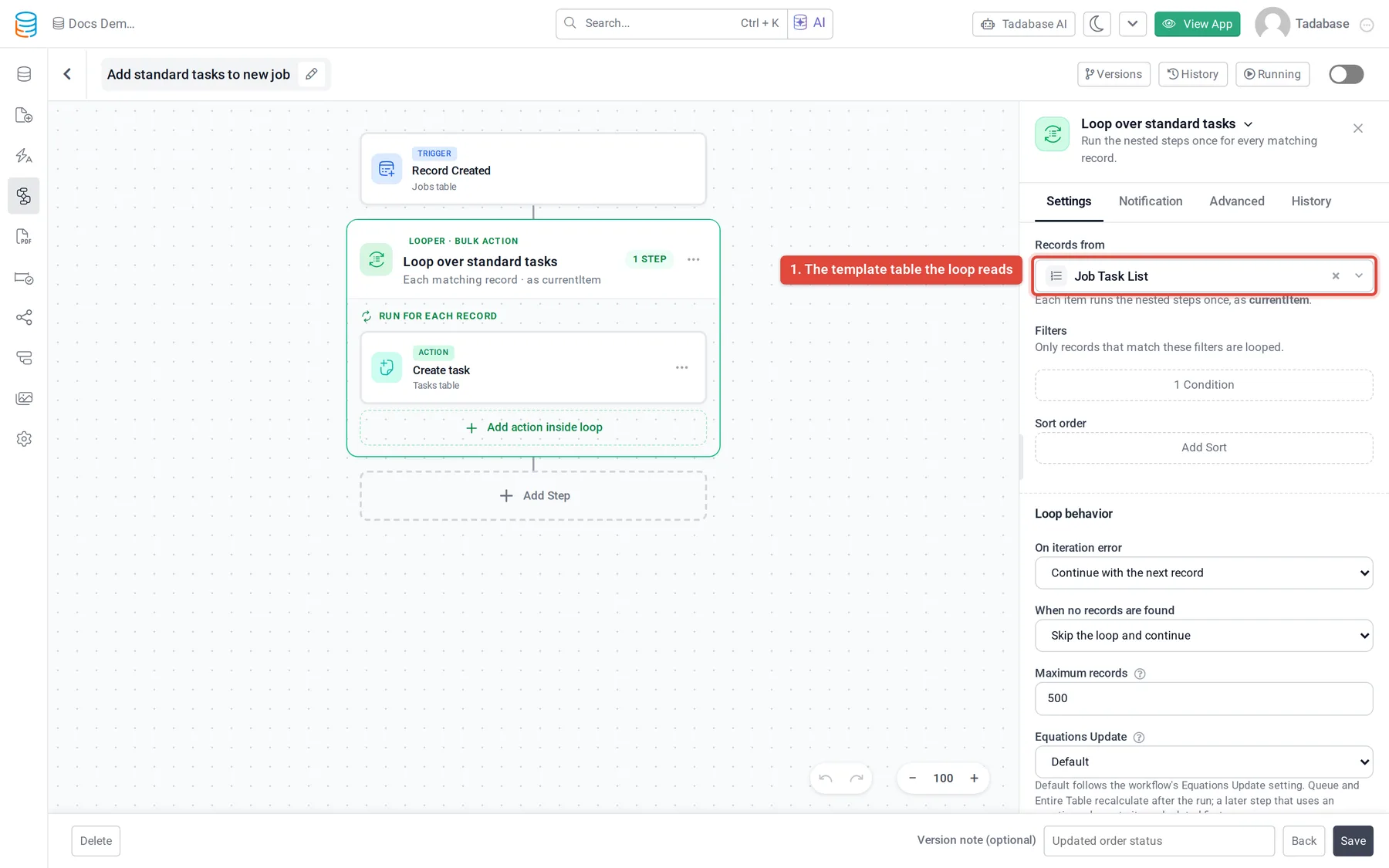
A loop over records runs on at most 500 records per run, which is far more than a task checklist needs.
Do it with Google Apps Script #
In this version a workflow sends the new job to a Google Apps Script web app with the Trigger Webhook action. The script reads the job and the template through the REST API and creates the tasks.
- Get an API key Create an API key with Allow Reads and Allow Updates turned on. See Get your API keys.
- Create the script Go to script.google.com, create a project and paste the script below. Replace the table IDs and field slugs at the top with your own.
- Store the keys In Project Settings > Script Properties, add
TADABASE_APP_ID,TADABASE_API_KEY,TADABASE_API_SECRET, andSHARED_SECRETset to a long random string of your choice. - Deploy it as a web app Choose Deploy > New deployment, select the Web app type, run it as yourself and give access to Anyone. Copy the web app URL.
- Call it from a workflow Create a workflow on Jobs with the Record Created trigger, then Add Step > Add Action > Trigger Webhook. In Webhook URL, paste the web app URL followed by
?key=and your shared secret. Leave Use record from on Source Record. Save.
// Creates the standard Tasks of a new Job from the Job Task List template.
// Script Properties: TADABASE_APP_ID, TADABASE_API_KEY, TADABASE_API_SECRET, SHARED_SECRET

// Replace these IDs and slugs with your own.
var JOBS_TABLE_ID = 'JOBS_TABLE_ID';
var JOB_TYPE_FIELD = 'field_101';            // Jobs: connection to Job Types
var TEMPLATE_TABLE_ID = 'JOB_TASK_LIST_TABLE_ID';
var TEMPLATE_JOB_TYPE_FIELD = 'field_201';   // Job Task List: connection to Job Types
var TEMPLATE_TASK_FIELD = 'field_202';       // Job Task List: task name
var TASKS_TABLE_ID = 'TASKS_TABLE_ID';
var TASK_NAME_FIELD = 'field_301';           // Tasks: task name
var TASK_JOB_FIELD = 'field_302';            // Tasks: connection to Jobs

function doPost(e) {
  var props = PropertiesService.getScriptProperties();
  if (!e.parameter.key || e.parameter.key !== props.getProperty('SHARED_SECRET')) {
    return ContentService.createTextOutput('forbidden');
  }

  // The Trigger Webhook action sends JSON: record_id is the ID of the new job.
  var payload = JSON.parse(e.postData.contents);
  var jobId = payload.record_id;

  // A connection field holds the IDs of the connected records.
  var job = api_('get', '/data-tables/' + JOBS_TABLE_ID + '/records/' + jobId).item;
  var jobTypeIds = job[JOB_TYPE_FIELD] || [];
  if (!jobTypeIds.length) return ContentService.createTextOutput('no job type');

  var page = 1;
  var totalPages = 1;
  do {
    var result = api_('get', '/data-tables/' + TEMPLATE_TABLE_ID + '/records?limit=100&page=' + page);
    result.items.forEach(function (template) {
      var types = template[TEMPLATE_JOB_TYPE_FIELD] || [];
      var matches = types.some(function (id) { return jobTypeIds.indexOf(id) !== -1; });
      if (matches) {
        var task = {};
        task[TASK_NAME_FIELD] = template[TEMPLATE_TASK_FIELD];
        task[TASK_JOB_FIELD] = [jobId];
        api_('post', '/data-tables/' + TASKS_TABLE_ID + '/records', task);
      }
    });
    totalPages = result.total_pages;
    page++;
  } while (page <= totalPages);

  return ContentService.createTextOutput('ok');
}

// Calls the Tadabase REST API. Waits and retries when it answers 429 (rate limited).
function api_(method, path, data) {
  var props = PropertiesService.getScriptProperties();
  var options = {
    method: method,
    headers: {
      'X-Tadabase-App-Id': props.getProperty('TADABASE_APP_ID'),
      'X-Tadabase-App-Key': props.getProperty('TADABASE_API_KEY'),
      'X-Tadabase-App-Secret': props.getProperty('TADABASE_API_SECRET')
    },
    muteHttpExceptions: true
  };
  if (data) {
    options.contentType = 'application/json';
    options.payload = JSON.stringify(data);
  }
  for (var attempt = 0; attempt <= 5; attempt++) {
    var response = UrlFetchApp.fetch('https://api.tadabase.io/api/v1' + path, options);
    var code = response.getResponseCode();
    if (code === 429) {
      var headers = response.getHeaders();
      Utilities.sleep(Math.min(Number(headers['Retry-After'] || headers['retry-after']) || 60, 60) * 1000);
      continue;
    }
    var body = JSON.parse(response.getContentText());
    if (code !== 200 || body.type !== 'success') {
      throw new Error('Tadabase API error ' + code + ': ' + JSON.stringify(body.msg || body));
    }
    return body;
  }
  throw new Error('The API is still rate limiting.');
}- The Trigger Webhook action posts JSON with the record under
recordand its ID inrecord_id, plustable_idandtable_name. The script only needsrecord_idand reads the rest through the API. - The shared secret in the URL stops anyone else who learns the web app URL from creating tasks.
- The script reads the whole template table and keeps the matching tasks in code, 100 records per call.
- Each task the script creates is one API call, and counts toward your app's API limits. See Rate limiting.
Check it worked #
- Add a job and open it: its tasks should appear within a few seconds.
- If nothing appears, open the workflow's run history and select the Trigger Webhook step. It shows the record that was sent and the status code the script answered with. See Workflow history and logs.
- In the Apps Script editor, Executions lists each run of
doPostwith any error the script raised. - If the step reports
Webhook responded with status 302.but the tasks were created, the script ran: Google answers web app calls with a redirect, and the Trigger Webhook action does not follow redirects.
Was this page helpful?
Something wrong or missing on this page? Tell us.