
Run workflows through the API
List your workflows, start a Manual workflow for a record, follow the run's progress and logs, and cancel a run, all through the REST API.
- Verified Nov 17, 2026
- Classic builder
On this page
Start a workflow from your own system, for example when an order arrives in another tool, and watch it run. The Workflows API starts workflows that use the Manual trigger and reads the run history of every workflow in the app.
Before you start #
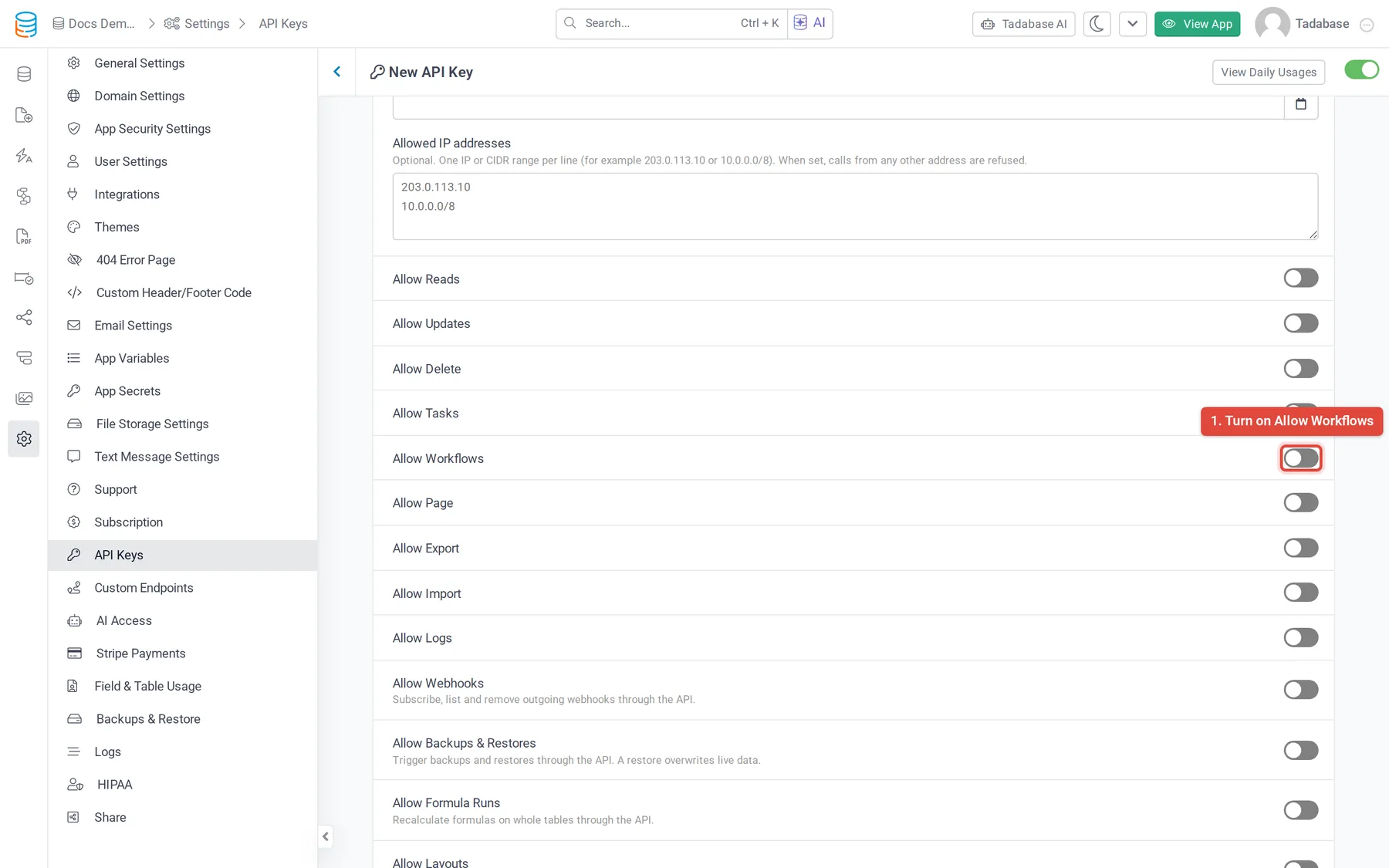
- Your plan must include API access, Workflows, and workflows through the API (the Allow Workflows switch shows a plan icon when it does not). Without them the API answers
412. - Turn on Allow Workflows on the API key in Settings > API Keys. Without it the API answers
403"This API key does not have Allow Workflows enabled." - Every URL starts with
https://api.tadabase.io/api/v1/workflows.
Endpoints #
| Method and path | What it does |
|---|---|
GET workflows | Lists workflows |
GET workflows/{workflowId} | One workflow |
POST workflows/ | Starts a Manual workflow |
POST workflows/ | Starts a Manual workflow for one record |
GET workflows/ | Runs that have not finished. Narrow it with /queue/{queueId} or /workflow/{workflowId} |
GET workflows/ | All runs, newest first. Narrow it with /queue/{queueId} or /workflow/{workflowId} |
GET workflows/ | The records one run processed, with the result for each |
GET workflows/ | The log entries for one record in one run |
GET workflows/ | Each step of one run: what ran, how long it took and any error |
POST workflows/ | Cancels a run that has not finished |
List endpoints take page and limit (default 20, at most 100) and answer with totalItems, totalPages, page, limit, hasNextPage and hasPreviousPage. IDs are the encoded IDs the API returns.
Find the workflow #
GET workflows accepts status (active or inactive), triggerType, dataTableId, search (part of the name), order (id, name, status, triggerType, stepsCount, createdAt, updatedAt) and orderBy (asc or desc).
{
  "type": "success",
  "workflows": [
    {
      "workflowId": "DVWQWRNZ49",
      "name": "Send job summary",
      "status": "active",
      "dataTableId": "lGArg7rmR6",
      "triggerType": "manual",
      "apiTriggerable": true,
      "stepsCount": 3,
      "occurrence": null,
      "nextRunAt": null,
      "createdAt": "2026-10-02 14:11:09",
      "updatedAt": "2026-11-12 08:40:51"
    }
  ],
  "totalItems": 1,
  "totalPages": 1,
  "page": 1,
  "limit": 20,
  "hasNextPage": false,
  "hasPreviousPage": false
}
apiTriggerable is true when you can start the workflow through the API: it is active and uses the Manual trigger. For a scheduled workflow, occurrence and nextRunAt say when it runs next.
Start a run #
- Use a Manual workflow In the builder, give the workflow the Manual trigger and make it active. Workflows with other triggers run only from their own trigger, and the API answers
422; an inactive workflow answers412. See Workflow triggers. - Call run Call
POST workflows/run/{workflowId}, orPOST workflows/run/{workflowId}/record/{recordId}to run it for one record of the workflow's table. - Keep the queueId The API answers
202with the run'squeueId. The run happens in the background.
curl -X POST https://api.tadabase.io/api/v1/workflows/run/WORKFLOW_ID/record/RECORD_ID \
  -H "X-Tadabase-App-Id: YOUR_APP_ID" \
  -H "X-Tadabase-App-Key: YOUR_API_KEY" \
-H "X-Tadabase-App-Secret: YOUR_API_SECRET"{
"type": "success",
"msg": "Workflow run queued.",
"queueId": "kN8Q3wPrJ1",
"workflowId": "DVWQWRNZ49",
"recordId": "4MXQJdrZ6v",
"status": "active",
"runMode": "live"
}Follow a run #
Call GET workflows/history/queue/{queueId}. Each run in runs has:
| Property | What it holds |
|---|---|
queueId, workflowId, recordId | Which run, which workflow, and the record it was started for |
status | Where the run is, for example active or processing while it works, then complete, complete_with_errors, error, or terminate after a cancel |
runType, runOrigin, runMode | How it started (such as manual or schedule), whether from the builder or the live app, and live or dry |
totalRecords, processedRecords, failedRecords, progress | How far it got |
message, errorMessage | The run's last message and error, if any |
runAt, startAt, endAt, createdAt | When it was scheduled, started, ended and created |
workflows/history also accepts workflowId, status, runType, runMode, runOrigin (builder or app), recordId, and a date range with from and to (a date such as 2026-11-01, or a date and time). workflows/status lists only runs that have not finished and does not take status, runType, runMode, from or to.
To see what happened inside a run, call .../records for the result per record (logId, recordId, status, startAt, endAt) and .../actions for each step (stepId, actionType, actionTitle, status, durationMs, errorCode, errorMessage, retryCount, startedAt, completedAt). The actions list takes status, actionType, stepId and recordId to narrow it. The same history is in the builder; see Workflow history and logs.
Cancel a run #
Call POST workflows/terminate/queue/{queueId}. It is safe to call more than once. The msg says what happened: "Workflow cancellation requested.", "Workflow cancellation has already been requested." or "Workflow run has already finished and cannot be cancelled."
Common problems #
| Response | Cause |
|---|---|
403 "This API key does not have Allow Workflows enabled." | Turn on Allow Workflows on the key |
412 with a plan message | Your plan does not include workflows through the API |
412 "This workflow is inactive..." | Activate the workflow |
422 "This workflow cannot be started through the Workflow API..." | The workflow does not use the Manual trigger |
404 "Record not found in this workflow's data table." | The record ID is from another table |
400 "The workflowId value is invalid..." | Use the encoded ID from GET workflows |
423 | The app is in maintenance; try again later |
Scheduled Tasks (older apps) #
Scheduled Tasks is the older automation that scheduled workflows replaced (see Scheduled workflows). Apps that still have Scheduled Tasks can keep running them through the older tasks endpoints, which need Allow Tasks on the API key and a plan that includes them in the API. New integrations should use a Manual workflow and the endpoints above instead.
| Method and path | What it does (older Scheduled Tasks endpoints) |
|---|---|
GET tasks | Lists the tasks: task_id, name, status, data_table_id, occurrence, next_run_at, type |
POST tasks/ | Runs the task now and answers with its task_queue_id when the run is done |
GET tasks/ | Runs in progress. Narrow it with /queue/{taskQueueId} or /task/{taskId} |
GET tasks/ | All runs. Narrow it with /queue/{taskQueueId} or /task/{taskId} |
POST tasks/ | Stops one run |
POST tasks/ | Stops the runs of one task |
The older task run entries have task_queue_id, task_id, total_records, total_record_proceed, start_at, run_type and status.
Was this page helpful?
Something wrong or missing on this page? Tell us.