
Trigger backups and restores through the API
Start a backup of your app or restore it from an earlier backup through the REST API, and find backup IDs and results in the backup logs.
- Verified Nov 17, 2026
- Classic builder
On this page
Take a backup of your app before a large import or a scheduled change from another system, and restore it if something goes wrong. These endpoints start the same backups and restores as the builder; see Backing up and restoring your app.
Before you start #
- Your plan must include API access.
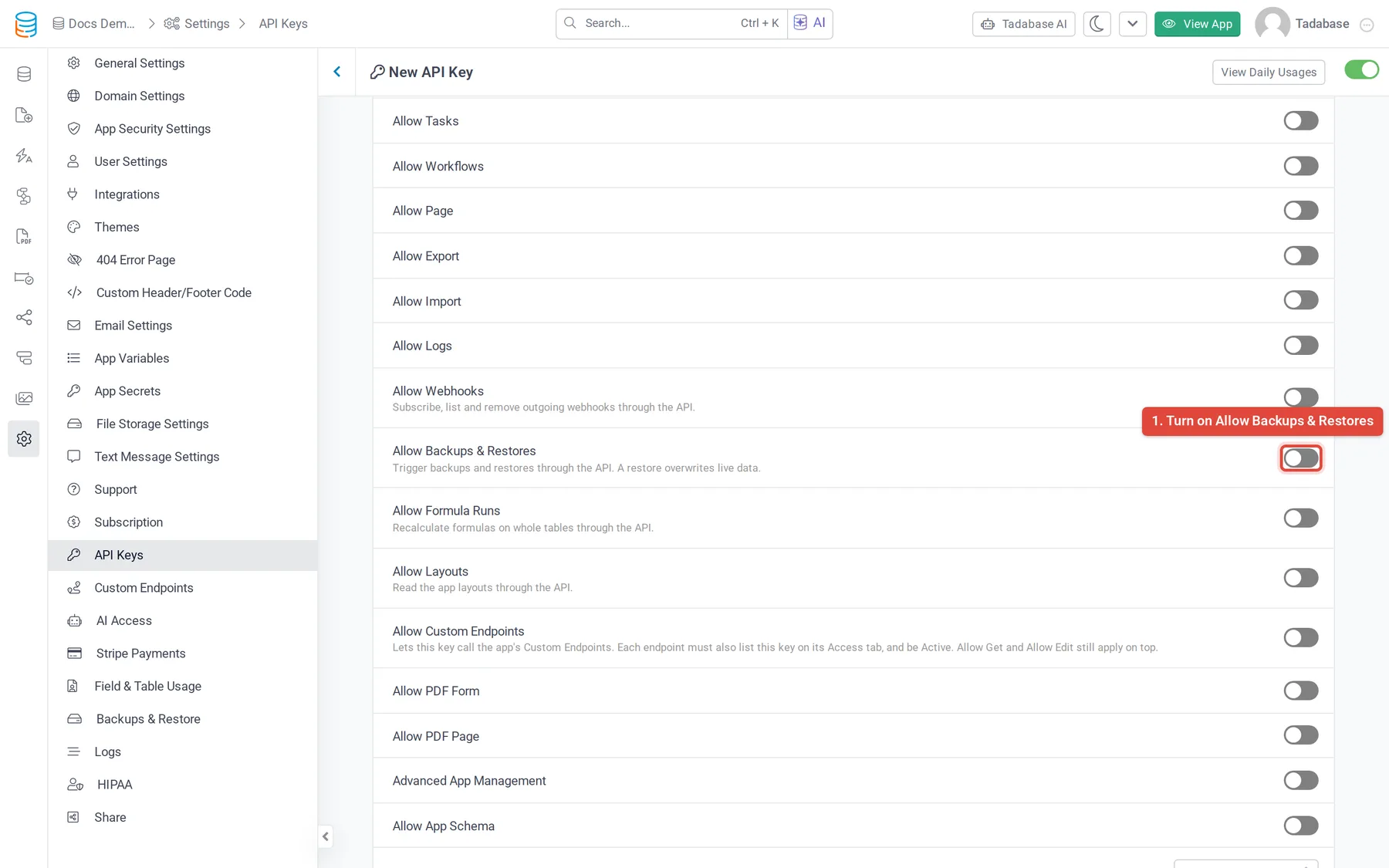
- Turn on Allow Backups & Restores on the API key in Settings > API Keys. Without it, calls answer
412with "The method being used is disabled for this API key." - To find backup IDs and follow results, the key also needs Allow Logs (see Read app logs through the API).
Take a backup #
curl -X POST https://api.tadabase.io/api/v1/backups/trigger \
  -H "X-Tadabase-App-Id: YOUR_APP_ID" \
  -H "X-Tadabase-App-Key: YOUR_API_KEY" \
-H "X-Tadabase-App-Secret: YOUR_API_SECRET"{
"type": "success",
"msg": "Backup has been queued and will be processed shortly",
"queued": true
}The backup runs in the background as a manual backup. Send include_logs=true to include the app's log tables in it. To see when it is done, read GET /api/v1/logs/backups: the newest entry is first, with its backup_id, status, start_at, end_at, total_tables and file_size_bytes.
Restore a backup #
- Find the backup Call
GET /api/v1/logs/backupsand copy thebackup_idof the backup you want. - Start the restore Call
POST /api/v1/restores/triggerwithbackup_id. The restore runs in the background. - Check the result Call
GET /api/v1/logs/restores. The newest entry shows the restore'sstatus,start_atandend_at.
curl -X POST https://api.tadabase.io/api/v1/restores/trigger \
  -H "X-Tadabase-App-Id: YOUR_APP_ID" \
  -H "X-Tadabase-App-Key: YOUR_API_KEY" \
  -H "X-Tadabase-App-Secret: YOUR_API_SECRET" \
-d "backup_id=BACKUP_ID"{
"type": "success",
"msg": "Restore has been queued and will be processed shortly",
"queued": true,
"backup_id": "BACKUP_ID"
}Common problems #
| Response | Cause |
|---|---|
412 "The method being used is disabled for this API key." | Allow Backups & Restores is off on the key |
400 "backup_id parameter is required" | Send the backup_id of the backup to restore |
404 "Backup not found or does not belong to this app" | The ID is wrong or is a backup of another app |
Was this page helpful?
Something wrong or missing on this page? Tell us.