
Secure your Tadabase builder account
Protect the account you build with: email codes at sign-in, an email on every sign-in, and a list of your active sessions you can end.
- Verified Nov 17, 2026
- Classic builder
On this page
Your builder account can change every app you own, so protect it as well as your apps. Three settings help: an emailed code at sign-in, an email each time someone signs in, and a list of the devices that are signed in.
Open your profile #
In the builder, click your name at the top right, then Edit Profile. The same menu has Change Password, All Active Sessions and Log Out.
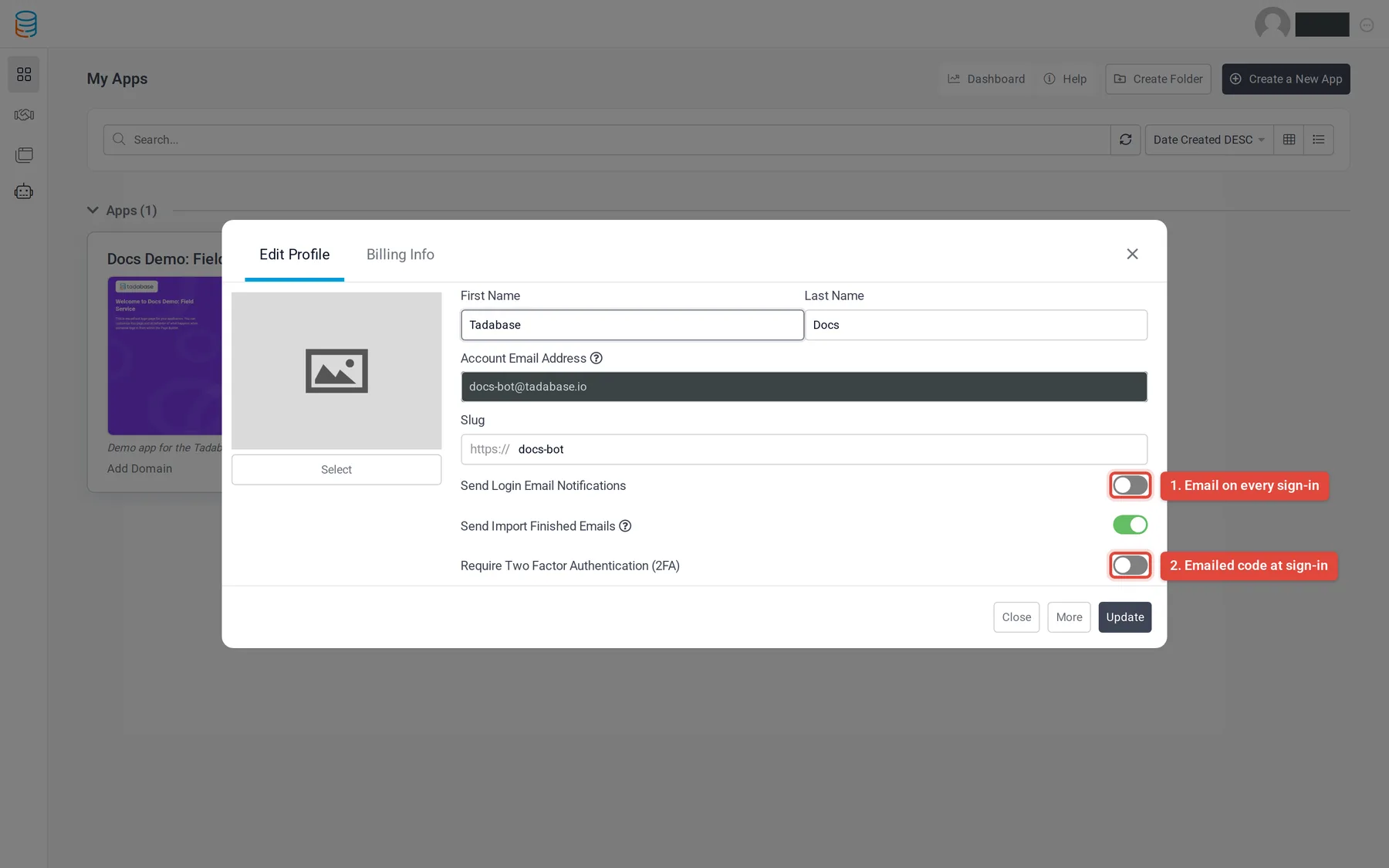
Require a code at sign-in (2FA) #
- Turn it on In Edit Profile, turn on Require Two Factor Authentication (2FA).
- Save Save your profile.
From then on, when you sign in with your email and password, Tadabase emails you a 6-digit code with the subject "Your One-time Verification Code for Tadabase". Enter it on the next screen to finish signing in.
- The code screen works for 60 minutes. After that, sign in again to get a new code.
- After 5 wrong codes, the code stops working and you need to sign in again.
- Each code works once.
Get an email every time you sign in #
In Edit Profile, turn on Send Login Email Notifications and save. Each successful sign-in to your builder account sends an email to your account address with the IP address and the browser and system used. If you get one you don't recognize, change your password and remove the other sessions (below).
See and end your active sessions #
- Open the list Click your name at the top right, then All Active Sessions.
- Review it Each row shows the IP and Last Activity of a signed-in session. The one you are using is marked This Device.
- End sessions Click Remove on a row to sign that session out, or Remove All Sessions to sign out every session.
More ways to keep the builder safe #
- Share the builder with team members instead of sharing your login, and give each person only the access they need: Sharing your app builder.
- Check who changed what in the builder: Builder update logs.
- Protect the apps themselves: Secure your app: an overview.
Was this page helpful?
Something wrong or missing on this page? Tell us.