
Score text for toxicity with Perspective API
Score how toxic a comment is with Google's Perspective API and save the score to a number field. Perspective API shuts down on December 31, 2026.
- Verified Nov 17, 2026
- Classic builder
On this page
The Perspective API pipe sends a piece of text to Google Jigsaw's Perspective API and returns a toxicity score between 0 and 1. Use it to flag comments or messages for review.
Get an API key #
You need a Google Cloud project with the Perspective (Comment Analyzer) API enabled and access approved by Jigsaw. In the Google Cloud console, go to APIs & Services > Credentials, click Create credentials > API key, and copy the key.
Install the pipe #
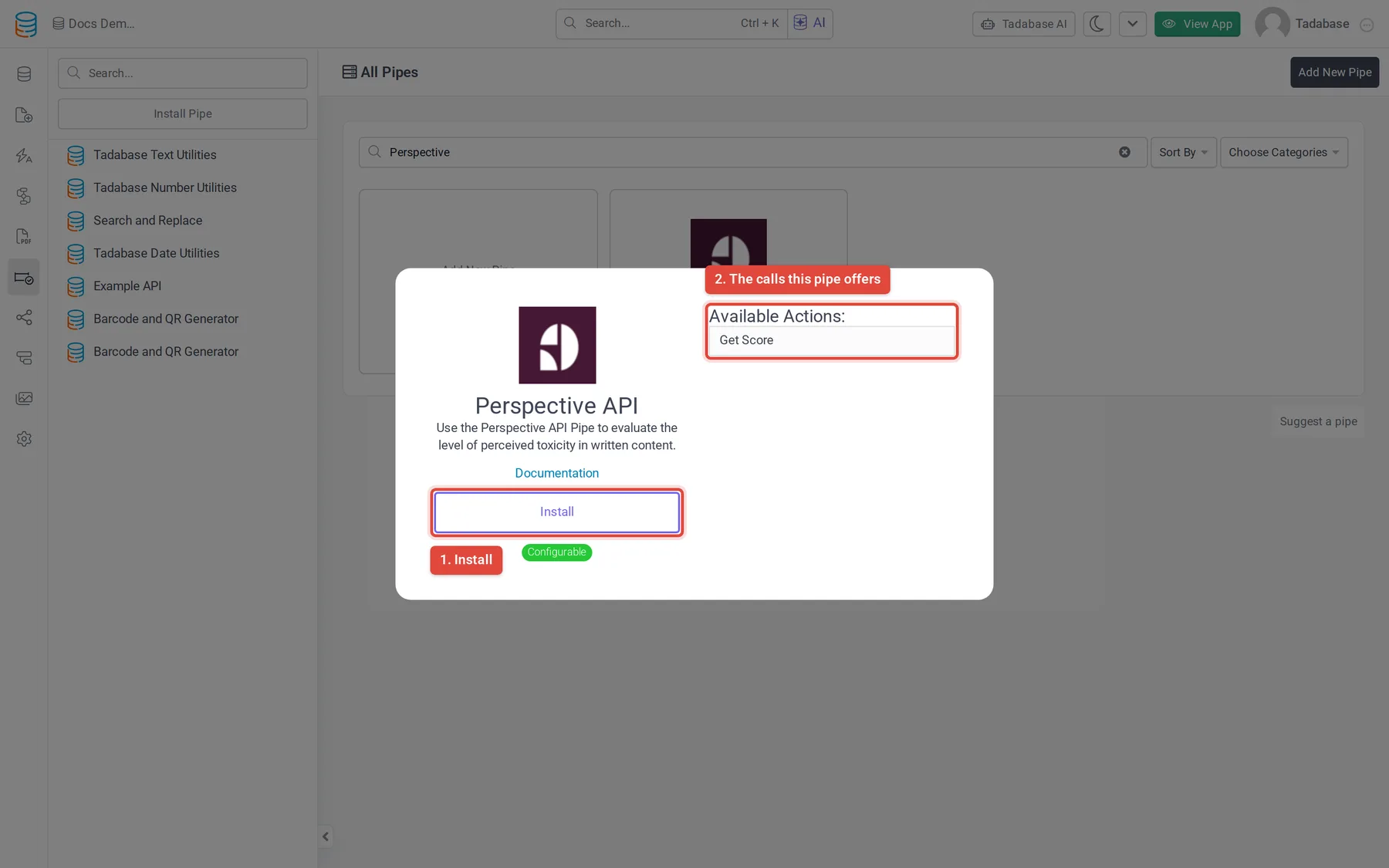
- Open Pipes In the builder, click the Pipes icon in the left menu. The All Pipes page lists every pipe you can install.
- Find the pipe Type
Perspectivein the Search... box and click the Perspective API card. The window shows what the pipe does and its Available Actions: the calls it offers. - Click Install Click Install. If your plan does not include pipes, an upgrade button shows instead.
- Enter the key Paste the key into Comment Analyzer API Key (required) and click Install. You can change it later on the installed pipe's Global Parameters tab; click Save after a change.
The Get Score call #
The pipe has one call, Get Score. It asks Perspective API for the TOXICITY attribute only, and tells it the text is in English (en).
| Name | What it is | |
|---|---|---|
| Parameter | Text | The text to score |
| Response | Toxicity Score | A number from 0 to 1: the probability that a reader would see the text as toxic |
| Response | Language | The language sent with the request |
| Response | Detected Language | The language Perspective API detected |
To score other attributes, such as INSULT or THREAT, open the call's Request tab and add them to requestedAttributes, then add a response for each one on the Response tab.
Use it in a workflow #
You can run any call of an installed pipe from a workflow with the Trigger Pipe action, and use what it returns in later steps. Pipes can also run in other parts of your app, as described in Using pipes.
Example: score each new comment and save the score to a number field.
- Add a number field In your Comments table, add a Number field named Toxicity with at least two decimal places, because the score is between 0 and 1.
- Start a workflow Create a workflow that runs when a comment record is created.
- Add a Trigger Pipe step Add the Trigger Pipe action, choose the Perspective API pipe's Get Score call in Pipe Method, and set Text to the comment's text field.
- Save the score Add an Update Record step and set Toxicity to the pipe's Toxicity Score.
- Act on it Add a condition on Toxicity, for example above
0.8, to hide the comment or notify a moderator.
More from Perspective API #
See the Perspective API developer documentation for the attributes it supports.
Was this page helpful?
Something wrong or missing on this page? Tell us.