
Capitalize First Letter in Fields
The CSS code needed to change all inputs is as follows.
- Not yet re-checked
- Classic builder
Moved from our previous help site and not yet re-checked against the current product. Last edited Sep 20, 2024.

We have two options.
- Add code that will change all inputs on that page
- Find the ID of a specific input and only target that one input (This is useful in case you don’t want a “password” field to be automatically capitalized)
Option 1
The CSS code needed to change all inputs is as follows.
input {
     text-transform: capitalize;
}
Option 2
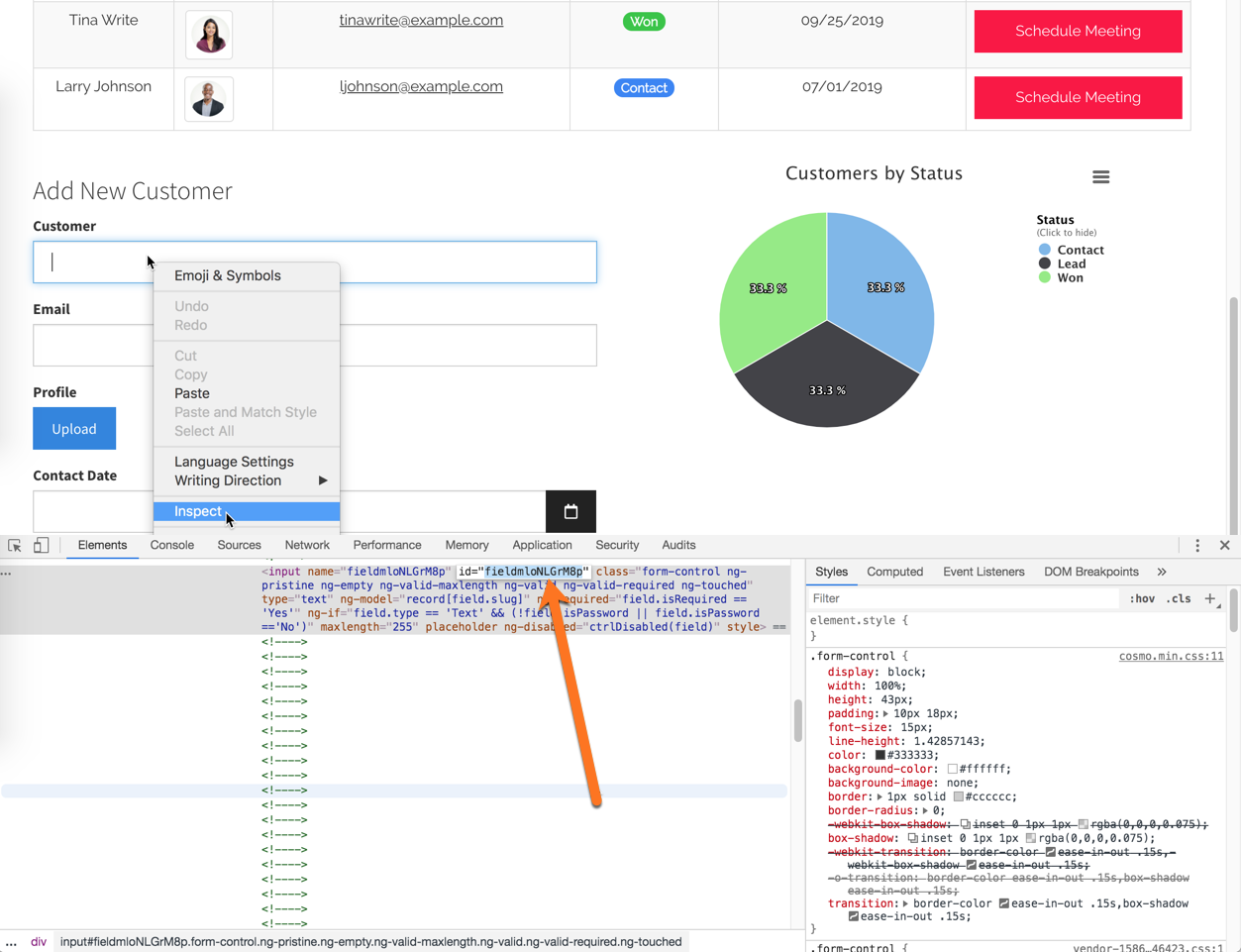
If you only want to target one specific input, you can do so by first finding the ID of the input. To do that, navigate to the front end of the app and right-click on the input, and select the option that says “inspect.” This should pull up the input tag code. As shown in the image below, you’ll see the id of the input (in this case, it’s id=“fieldmloNLGrM8p”)
Step 2
The CSS code needed to change only that one input would be as follows.
#fieldmloNLGrM8p {
     text-transform: capitalize;
}
#fieldmloNLGrM8p, #fieldB8qQPZr16n {
     text-transform: capitalize;
}
Original Community Post:
Capitalized fields? - Community Discussions / How Do I - Tadabase Community
Was this page helpful?
Something wrong or missing on this page? Tell us.