
JS to Show/Hide Components Depending on Multiple Data Fields
This snippet will show you how to display certain form components (all others are hidden) depending on special conditions.
- Not yet re-checked
- Classic builder
Moved from our previous help site and not yet re-checked against the current product. Last edited Sep 20, 2024.
This snippet will show you how to display certain form components (all others are hidden) depending on special conditions.
Step 1
Add the class of “hide” as an “Additional CSS class” in all of the form component settings.
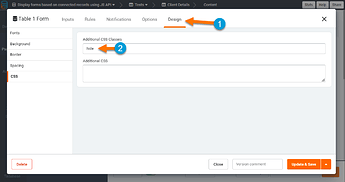
Step 2
Add the JavaScript pasted below.
In the example below, the related components will only be shown for facility records which have a Facility Type of Healthcare and a specific category of "Surgery" or "Anesthetizing Location".
Replace the 'types' and 'categories' shown below (Healthcare, Surgery, Anesthetizing Location) with information from your app.
var DETAIL_COMPONENT_ID = "Component_ID";
var FACILITY_TYPE = "field_id";
var SPECIAL_CONDITION = "field_id";
var COMPONENT_TO_SHOW = "Component_ID";

TB.render(DETAIL_COMPONENT_ID, function(data) {
if(data.record[FACILITY_TYPE] === "Healthcare"){
if(data.record[SPECIAL_CONDITION] === "Surgery" && data.record[SPECIAL_CONDITION] === "Anesthetizing Location"){
TB.showComponent(COMPONENT_TO_SHOW);
}
}
});
Replace the Component IDs in the code with the IDs of your component.

Replace the Field Slugs in the code with the Slugs of your fields.

Original Community Post:
https://community.tadabase.io/t/js-to-show-hide-components-depending-on-multiple-data-fields/2105
Was this page helpful?
Something wrong or missing on this page? Tell us.