
Export Multiple Tables in a Single File
Please note that this is now available as a plugin for easier installation. While you can use this document as a reference, the recommended method to add…
- Not yet re-checked
- Classic builder
Moved from our previous help site and not yet re-checked against the current product. Last edited Sep 20, 2024.
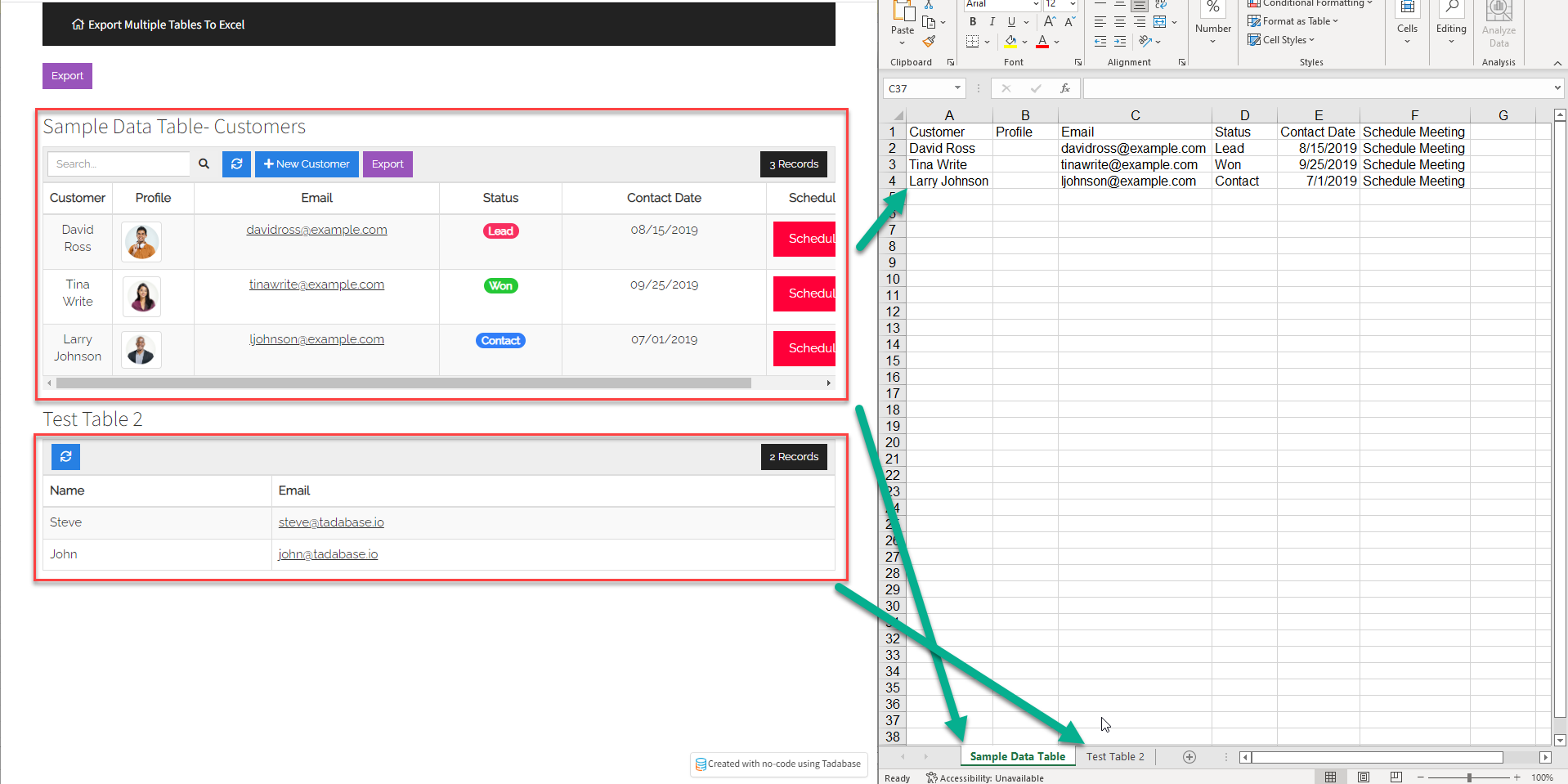
You may want to simplify the export of many data tables within 1 page. Here I will show you just how you can achieve this.
The First step is to add the following code to the app's footer.
<script src="https://cdnjs.cloudflare.com/ajax/libs/xlsx/0.16.9/xlsx.min.js" integrity="sha512-Bkf3qaV86NxX+7MyZnLPWNt0ZI7/OloMlRo8z8KPIEUXssbVwB1E0bWVeCvYHjnSPwh4uuqDryUnRdcUw6FoTg==" crossorigin="anonymous"></script>
Next, inside your page, we’ll create a custom export button that will trigger our code to download the Excel file.

Add the following code inside the source code <> in a new HTML component on the page.
<button id="export-button" class="btn btn-info btn-sm t-export-button">Export</button>
Finally, to finish up, add the following code to the JavaScript tab of this page; make sure to replace the IDs with your values.
TB.render('component_20', function(data) {
    function exportTable(type, fn, dl) {

        //Create a new Workbook.
        var workbook = XLSX.utils.book_new();

        //Find the first table to be added to the Sheet.
        var sheet1 = XLSX.utils.table_to_sheet(document.querySelector("#x_element_page_6_20"));

        //Give the first sheet a name
        XLSX.utils.book_append_sheet(workbook, sheet1, "Sample Data Table");

        //same thing for Sheet 2, find the sheet using the ID and give the sheet a name.
        var sheet2 = XLSX.utils.table_to_sheet(document.querySelector("#x_element_page_6_39"));
        XLSX.utils.book_append_sheet(workbook, sheet2, "Test Table 2");

        return dl ?
            XLSX.write(workbook, {
                bookType: type,
                bookSST: true,
                type: 'base64'
            }) :

            // Name the sheet that will be downloaded.
            XLSX.writeFile(workbook, 'filename.xls');

    }


    $("#export-button").click(function() {
        exportTable('xls');
    });

});
Original Community Post:
https://community.tadabase.io/t/export-single-file-multiple-tables/2051/2
Was this page helpful?
Something wrong or missing on this page? Tell us.