
Change the Background Color of 2 Cards if the Numbers Match
This snippet will teach you how to change the background color of cards when the numbers on the cards match.
- Not yet re-checked
- Classic builder
Moved from our previous help site and not yet re-checked against the current product. Last edited Sep 20, 2024.
This snippet will teach you how to change the background color of cards when the numbers on the cards match.
Normal state:

Change to this when numbers match:

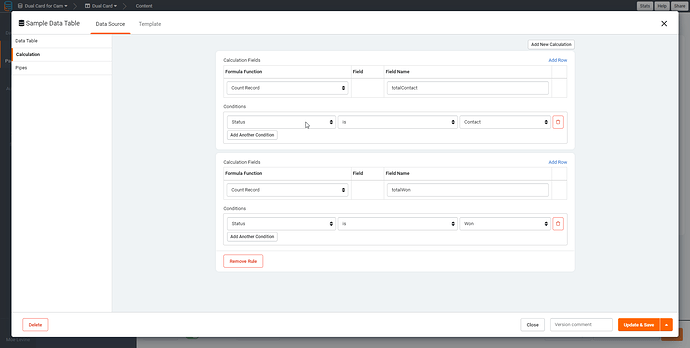
- Create a card with 2 values, here I’m counting the 'Total Won" and “Total Contact”
- Choose one of the cards from the library or create your own design. In this case I chose a design and then copied it so there are 2 of them. Or just copy/paste this into your template. Remember to update the ‘totalWon’ and totalContact based on the values you set in step 1.
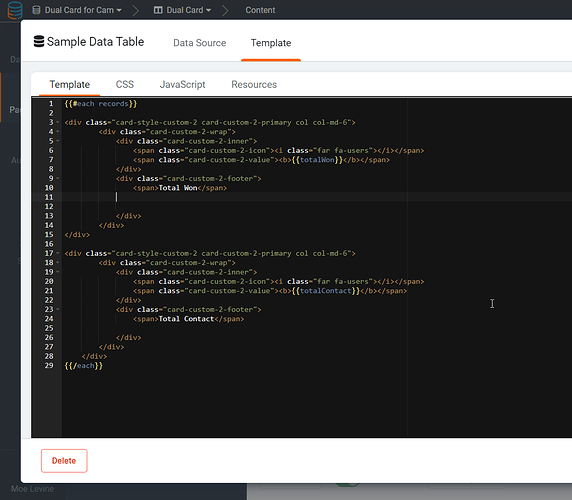
{{#each records}}

<div class="card-style-custom-2 card-custom-2-primary col col-md-6">
    	<div class="card-custom-2-wrap">
    		<div class="card-custom-2-inner">
				<span class="card-custom-2-icon"><i class="far fa-users"></i></span>
				<span class="card-custom-2-value"><b>{{totalWon}}</b></span>
			</div>
			<div class="card-custom-2-footer">
				<span>Total Won</span>


			</div>
		</div>
</div>

<div class="card-style-custom-2 card-custom-2-primary col col-md-6">
    	<div class="card-custom-2-wrap">
    		<div class="card-custom-2-inner">
				<span class="card-custom-2-icon"><i class="far fa-users"></i></span>
				<span class="card-custom-2-value"><b>{{totalContact}}</b></span>
			</div>
			<div class="card-custom-2-footer">
				<span>Total Contact</span>

			</div>
		</div>
    </div>
{{/each}}
3. Add some custom CSS code in the CSS tab:
(If you copied and pasted the code above, make sure to copy/paste this whole CSS, otherwise, just the top class “green-background” is important.
.green-background {
    background: green !important;
    color: white !important;
}

.card-style-custom-2{
    margin-top: 2rem;
    margin-bottom: 2rem;
}
.card-style-custom-2 .card-custom-2-header {
    background: #fff;
    margin: 5px 0;
    padding: 5px 10px;
    color:#333333;
}
.card-style-custom-2 .card-custom-2-inner{
    text-align: center !important;
    background: #fff;
    border-bottom: 7px solid #6993ff;
    padding: 10px;
    font-size: 25px;
}
.card-style-custom-2 .card-custom-2-icon{
    display: block;
    font-size: 37px;
    padding-bottom: 1rem;
}
.card-style-2 .card-custom-2-value, .card-style-2 .card-custom-2-suffix{
    font-size: 18px;
}
.card-style-custom-2 .card-custom-2-footer {
    padding-top: 2rem;
    padding-bottom: 2rem;
    margin-top: 0px;
    padding: 15px 10px;
}


/* card-light-primary */
.card-custom-2-primary .card-custom-2-wrap{
    border: 1px solid #e1e9ff;
}
.card-custom-2-primary .card-custom-2-inner{
    border-bottom: 7px solid #6993ff !important;
}
.card-custom-2-primary .card-custom-2-footer{
    background:#e1e9ff;
    color:rgb(101, 86, 86);
}
.card-custom-2-primary .card-custom-2-icon{
    color:#6993ff !important;
}
.card-custom-2-primary .card-custom-2-value{
    color:#6993ff;
}
.card-custom-2-primary .card-custom-2-suffix{
    color:#6993ff;
}- Now we need to add a custom class but only if certain condition is met:
In your code find this line:
<div class="card-custom-2-footer">and replace it with this:
<div class="card-custom-2-footer {{#is totalWon totalContact}} green-background{{/is}}">Original Community Post:
https://community.tadabase.io/t/change-the-background-color-of-2-cards-if-the-numbers-match/1866/7
Was this page helpful?
Something wrong or missing on this page? Tell us.