
Simple Scraper Setup
This is a great solution extract data from any website in seconds by setting up Simple Scraper by API.
- Not yet re-checked
- Classic builder
Moved from our previous help site and not yet re-checked against the current product. Last edited Sep 20, 2024.

This is a great solution extract data from any website in seconds by setting up Simple Scraper by API.
Step 1
Create a new pipe and set the URL of the pipe to the URL from the SimpleScraper site.
https://simplescraper.io/api/meAdMWHDda0hd0O2nE7qf?apikey=YOUR_API_KEY&limit=100&run_now={run_now}&source_url={source_url}
Step 2
Create two new parameters, as seen in the image below.
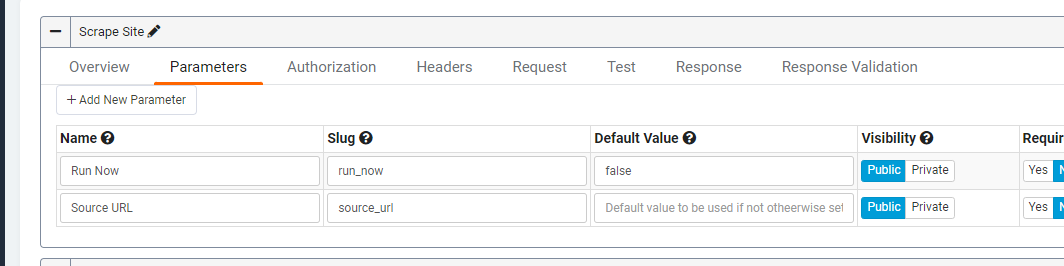
You should now be able to test the scraper by passing a unique URL in the source_url parameter.
Step 3
Create the Response to be used in the app. The Scraper returns an array, so we can only work with one value simultaneously in the pipe. You, therefore, need to structure it like so:

Original Community Post:
Help with SimpleScraper source_url - Community Discussions / How Do I - Tadabase Community
Was this page helpful?
Something wrong or missing on this page? Tell us.