
Change the Time Field to a Dropdown
Please note that this is now available as a plugin for easier installation. While you can use this document as a reference, the recommended method to add…
- Not yet re-checked
- Classic builder
Moved from our previous help site and not yet re-checked against the current product. Last edited Sep 20, 2024.
On this page
The time picker field comes with a particular style that often isn't as mobile friendly. To change the field to a simple dropdown you can use this snippet to do so.

Header Code: #
<link rel="stylesheet" href="https://cdnjs.cloudflare.com/ajax/libs/jquery-timepicker/1.13.18/jquery.timepicker.min.css" integrity="sha512-GgUcFJ5lgRdt/8m5A0d0qEnsoi8cDoF0d6q+RirBPtL423Qsj5cI9OxQ5hWvPi5jjvTLM/YhaaFuIeWCLi6lyQ==" crossorigin="anonymous" />Footer Code #
<script src="https://cdnjs.cloudflare.com/ajax/libs/jquery-timepicker/1.13.18/jquery.timepicker.js" integrity="sha512-17lKwKi7MLRVxOz4ttjSYkwp92tbZNNr2iFyEd22hSZpQr/OnPopmgH8ayN4kkSqHlqMmefHmQU43sjeJDWGKg==" crossorigin="anonymous"></script>Get Component ID #
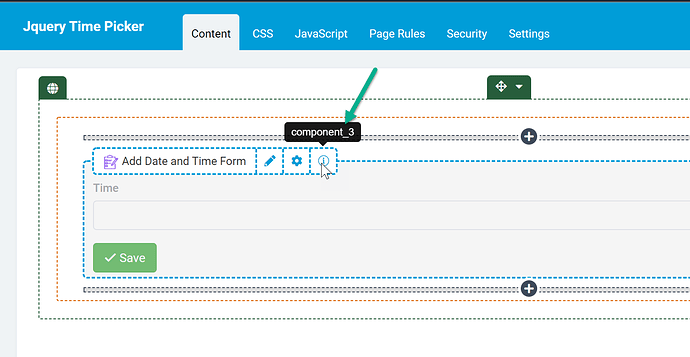
Next, find the component ID that has the Time field in it (in my case its component_3):
Add Javascript Code: #
//Be sure to change the component ID to your component id.

TB.render('component_3', function(data) {
    $('.t-form-time input').timepicker({ 'timeFormat': 'h:i A' });
});
Additional Options #
There are many customizable options that can be configured to your specificity. Please see this link for all configuration options. https://www.jonthornton.com/jquery-timepicker/
Example 1 - min and max times
In the example below the earliest times that can be selected will be 2PM and latest 1130PM.
//Be sure to change the component ID to your component id.

TB.render('component_3', function(data) {
    $('.t-form-time input').timepicker({
    'timeFormat': 'h:i A',
    'minTime': '2:00pm',
	'maxTime': '11:30pm'
    });
});
Original Community Post: #
https://community.tadabase.io/t/change-time-field-format-for-mobile/901
Was this page helpful?
Something wrong or missing on this page? Tell us.