
Create a Record Entry Alternative to Using a QR Code Scan
This is a way to scan an NFC to create the record entry without allowing a form to be filled out/edited (all behind the scenes). This will require an app…
- Not yet re-checked
- Classic builder
Moved from our previous help site and not yet re-checked against the current product. Last edited Sep 20, 2024.

This is a way to scan an NFC to create the record entry without allowing a form to be filled out/edited (all behind the scenes). This will require an app to write to NFC (Example: NFC Tools for Android), and then the rest is done via basic JavaScript.
Step 1
In this walkthrough, I want the form to have three fields.
- Submitted By:
- Location (connection field)
- Date and Time
Step 2
Get the location's ID and save that value as a basic text value to the NFC chip.
In my case, I have two chips (or 2 locations); one has the value of “4MXQJdrZ6v” and the other “DVWQWRNZ49.”
Step 3
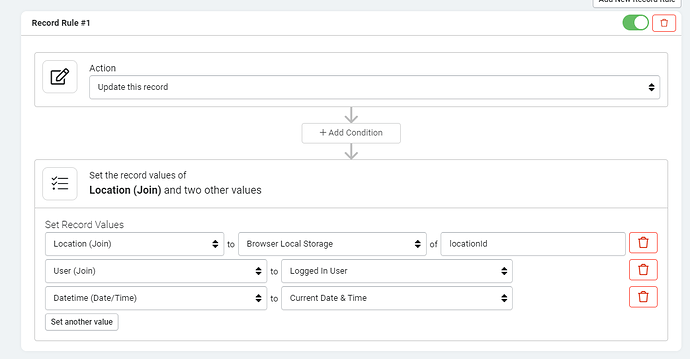
Create a form on a page without any fields but with three rules. This is all we need to do on the form part:
Step 4
Find the Id of your component by hovering over the info icon.

Step 5
Add the following code to the JavaScript tab of your page.
TB.render('component_X', function(data) {

    const ndef = new NDEFReader();

    async function startScanning() {
        await ndef.scan();

        ndef.addEventListener("reading", ({
            message,
            serialNumber
        }) => {

            const textDecoder = new TextDecoder(message.records[0].encoding);
            var cardValue = textDecoder.decode(message.records[0].data);

            localStorage.setItem('locationId', cardValue);
            data.ele.find('.form-submit .af-form-submit').click();

        });
    }

    startScanning();

});
Step 6
You may additionally add a class to the form submit button of ‘hide’ so we don’t ever see it.

Original Community Post:
QR Code Scan Creates Record Entry - Community Discussions / How Do I - Tadabase Community
Was this page helpful?
Something wrong or missing on this page? Tell us.