
View Record Details on Parent Page
Please note that this is now available as a plugin for easier installation. While you can use this document as a reference, the recommended method to add…
- Not yet re-checked
- Classic builder
Moved from our previous help site and not yet re-checked against the current product. Last edited Sep 20, 2024.
Here is a demo link to view the example

Here is a great way to customize the details page to be viewed on the parent page by an action button. Follow the steps below to complete this process.
Step 1
Create a text field in your Data Table and name it “recordId.”
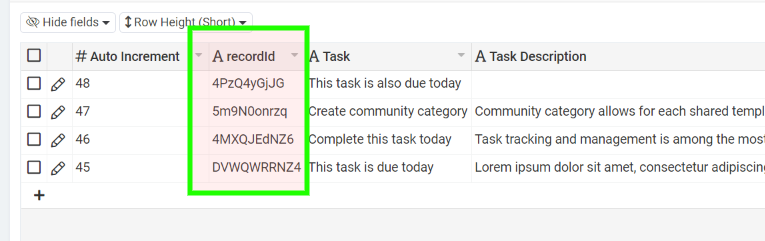
Step 2
Create a table rule that says: On Create or Edit, set {recordId} to a record value of (Record ID)

Step 3
Create an equation field and paste the following equation.
CONCAT('<button',CHAR(32),'recordId="',{recordId},'"',CHAR(32),'id="detailsLink"',CHAR(32),'class="btn',CHAR(32),'btn-block',CHAR(32),'btn-primary',CHAR(32),'loadIntoIframe">VIEW</a>')

Step 4
Create a new row with an HTML component on the parent page where you wish to display record details.

Step 5
Paste the following HTML into the source code <> of the HTML component.
<p><iframe id="my-iframe" class="taskDetails" name="detailsIframe" width="100%" height="800px" frameborder="0"></iframe></p>
Step 6
Paste the following CSS into the page CSS tab.
 @media only screen and (min-width: 992px) {

     .taskDetails {

         color: black;

         background-color: #fff;

         height: 100vh;

         /*Sets the width of the side bar*/

         width: 400px;

         position: fixed;

         top: 0;

         /*Positions the side bar next to the Main Menu - 125px is the width of the menu*/

         right: 0px;

         z-index: 5;

         outline: none;

         overflow-y: hide;

         border-left: 2px solid #eeeeee;

     }

     .t-pagecontainer {

         margin-right: 400px;

     }

 }
Step 7
Paste the following into the JS tab of the page
TB.render('component_3', function(data) {
    $('.loadIntoIframe').each(function() {
        var recordId = $(this).attr('recordid');
        $(this).click(function() {
            $('#my-iframe').attr('src', 'details_URL_goes_here' + recordId);
        });
    });
});
Step 8
Create a new layout with no menu, breadcrumbs, or user menu. We want this layout to be completely blank.

Step 9
Create a parent + details page in the new layout for the data table you worked with in the previous steps.

Step 10
Preview the parent page you just created, go to the details page, and get the URL for the details page. Copy the URL without the record ID.

Step 11
Get the component_id for your data component on the parent page with the iframe.

Step 12
On the page containing your iframe, ensure the equation field with the details link is visible in your data component.

Preview the page and click the button!
Original Community Post:
https://community.tadabase.io/t/view-record-details-on-a-parent-page/1175
Was this page helpful?
Something wrong or missing on this page? Tell us.