
Field Title Language - Based on Logged in Users' Language
Please note that this is now available as a plugin for easier installation. While you can use this document as a reference, the recommended method to add…
- Not yet re-checked
- Classic builder
Moved from our previous help site and not yet re-checked against the current product. Last edited Sep 20, 2024.

If you have multiple users who you would like to customize the language of your page for each, this is how you can do so.
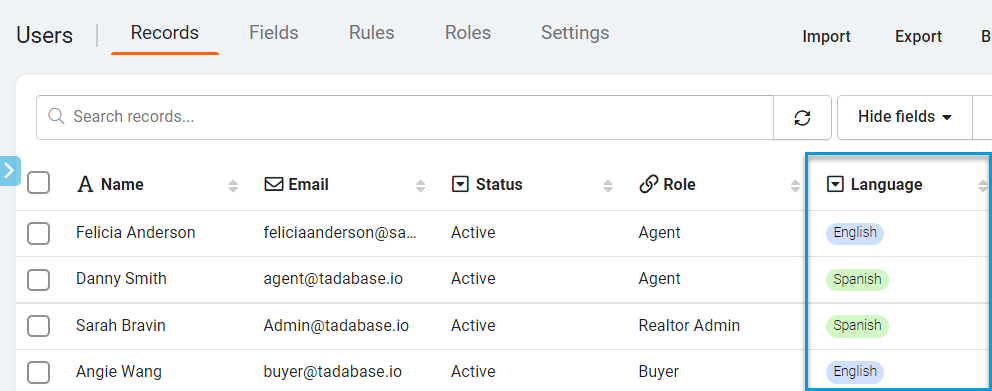
1. Inside your Users table, add a field called “Language." 2. Create a dictionary or words that will be converted into different languages. The word on the left is what we will search for, and the right is what will be replaced depending on the chosen language".
const translations = {
    // English translations
    "English": {
        "Customer": "Customers Name",
        "Email": "Enter your email address",
        "Save": "Save Record",
    },
    // Spanish translations
    "Spanish": {
        "Customer": "Nombre del cliente",
        "Save": "Guardar registro",
        "Email": "Dirección de correo electrónico",
    },
};
3. Let’s add the code in the JavaScript of the Layout.
First, you will need to get the logged in User’s language:
var language = "{loggedInUser.Language}";
Then, we need to be sure if no language is selected, we have a default language (or if they are not logged in.
if(!language){ language = 'English' }
Finally, we need the code that finds and replaces the text. I’m finding the text for table headers, form labels, buttons, and field labels in this setup. We’re also setting this to run for all components, so there is no need to do this for each component.
TB.render('any', function(data) {
    $(".lbl, label, th, button span").each(function(index) {
        const text = $.trim($(this).text());
        if (typeof translations[language][text] !== 'undefined') {
            $(this).text(translations[language][text]);
        }
    });
});
For this example, the entire code would be as follows:
var language = "{loggedInUser.Language}";

if (!language) {
    language = 'English'
}

const translations = {
    // English translations
    "English": {
        "Customer": "Customers Name",
        "Email": "Enter your email address",
        "Save": "Save Record",
    },
    // Spanish translations
    "Spanish": {
        "Customer": "Nombre del cliente",
        "Save": "Guardar registro",
        "Email": "Dirección de correo electrónico",
    },
};

TB.render('any', function(data) {
    $(".lbl, label, th, button span").each(function(index) {
        const text = $.trim($(this).text());
        if (typeof translations[language][text] !== 'undefined') {
            $(this).text(translations[language][text]);
        }
    });
});
Original Community Post:
https://community.tadabase.io/t/multiple-language-options-for-fied-title-name/2357
Was this page helpful?
Something wrong or missing on this page? Tell us.