
Update your profile, password or delete your account
Sign in to the builder, reset a forgotten password, edit your name, slug and email settings, change your password, or close your Tadabase account.
- Verified Nov 17, 2026
- Classic builder
On this page
Your Tadabase account is the login you use to build apps. Everything on this page starts from the user menu: click your name in the top right corner of the builder.
Sign in to the builder #
Go to build.tadabase.io and sign in with the email address and password of your account. If you turned on email verification codes, Tadabase then asks for the code it emails you; see Sign in to the builder with an email verification code.
Apps stored in another data region have their own builder address, such as build.eu.tadabase.io. In My Apps, those apps show their region on the app card. See Tadabase data center regions.
Reset a forgotten password #
- Open the reset form On the sign-in page, click Forgot password and enter the email address of your account.
- Open the email You get an email with the subject Tadabase Account Password Reset. The page says: A new password reset link has been sent to the email address provided.
- Set a new password Click the link in the email within 60 minutes and enter your new password. It needs at least 8 characters, with upper-case and lower-case letters, a number and a special character.
You can ask for a new link once a minute. If the link has expired, request a new one.
Edit your profile #
- Open Edit Profile Click your name in the top right corner, then Edit Profile.
- Change what you need Edit the fields in the table below.
- Save Click Update. You see The profile has been successfully updated.
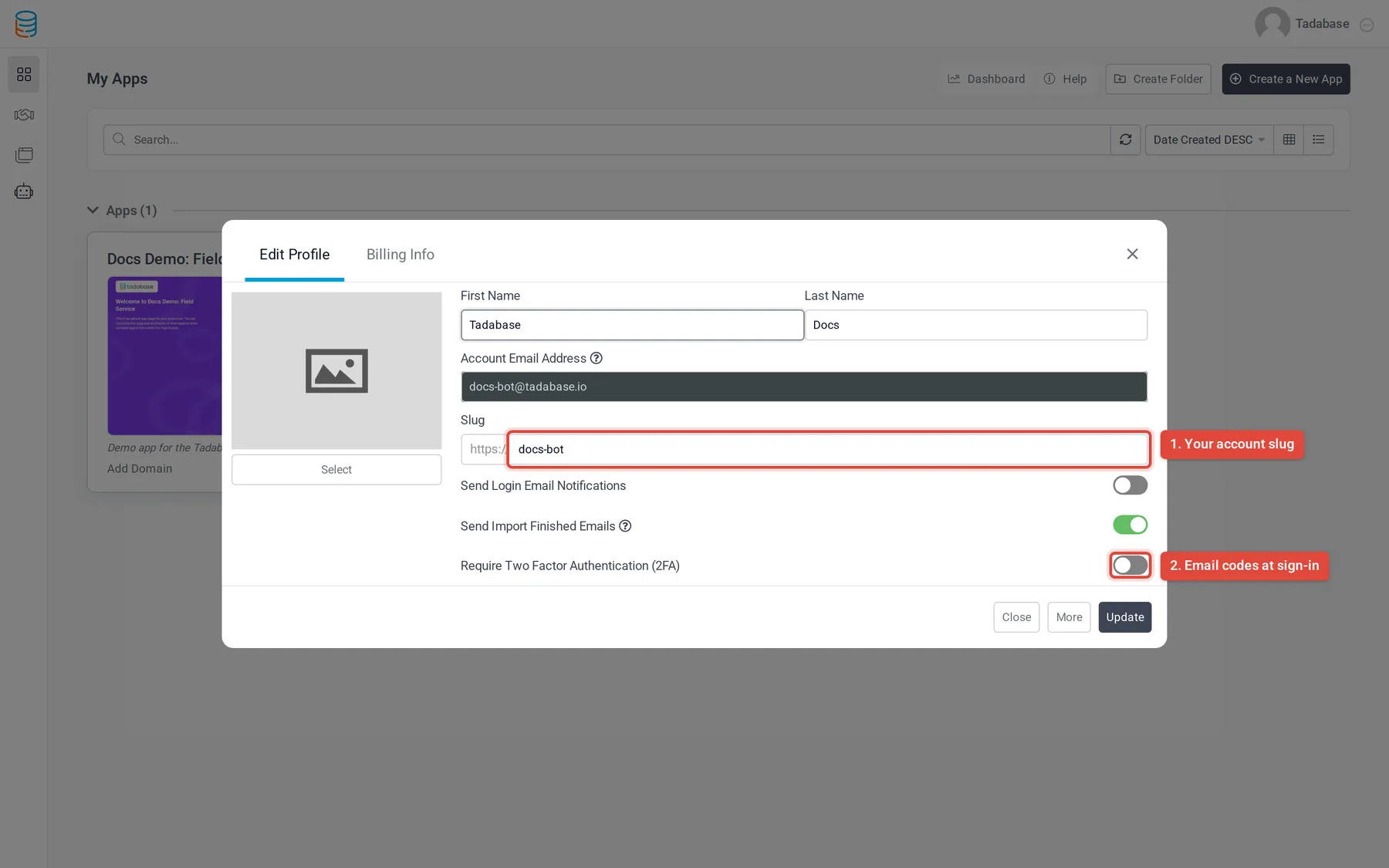
| Field | What it does |
|---|---|
| Profile image | Click Select to upload a JPG or PNG image, or Remove to go back to the default avatar. |
| First Name, Last Name | Your name, shown in the user menu. Both are required. |
| Account Email Address | Read-only. To change the email address of your account, contact support@tadabase.io. |
| Slug | Your account's name in the default web addresses of your apps. It must be unique. |
| Send Login Email Notifications | Yes emails you each time someone signs in to your account, with the browser and IP address. |
| Send Import Finished Emails | Yes (the default) emails you when an import into one of your apps finishes, with any rows that did not go in. |
| Require Two Factor Authentication (2FA) | Yes asks for a code sent to your email each time you sign in. See Sign in to the builder with an email verification code. |
The Billing Info tab in the same window holds the name, phone and address used for billing. See Manage your subscription, payment card and invoices.
Change your password #
- Open Change Password Click your name in the top right corner, then Change Password.
- Enter the passwords Fill in Old Password, New Password and Confirm Password. The checklist under the fields shows which password rules the new password meets.
- Save Click Update.
Tadabase emails you to confirm the change and signs you out everywhere else. Your current browser stays signed in. If the old password is wrong, you see Your existing password is incorrect.
To see where you are signed in, open the user menu and click All Active Sessions.
Delete your account #
- Open Edit Profile Click your name in the top right corner, then Edit Profile.
- Show the delete button Click More at the bottom of the window.
- Delete Click Delete My Account and confirm in the browser prompt.
What happens next:
- You are signed out and the account is closed.
- Your billing customer record at Stripe is removed, so the subscription stops and you are not charged again.
- Your apps stop working, in the builder and for the people who use them.
- If you try to sign in again with the same email and password, the sign-in page tells you the account is closed.
Apps shared with you by other accounts belong to their owners and are not deleted.
Was this page helpful?
Something wrong or missing on this page? Tell us.