
Show logs inside your live app
Add a Log Table component to a page to show page views, logins, emails, record changes and other logs to your app's users, filtered to what each one may see.
- Verified Nov 17, 2026
- Classic builder
On this page
The Log Table component shows one of your app's logs on a page of the live app, such as who viewed a page, who logged in or which emails went out. Use it to give admins or managers an audit view without giving them access to the builder.
Add a Log Table to a page #
- Open the page In the Page Builder, open the page and select the Components tab.
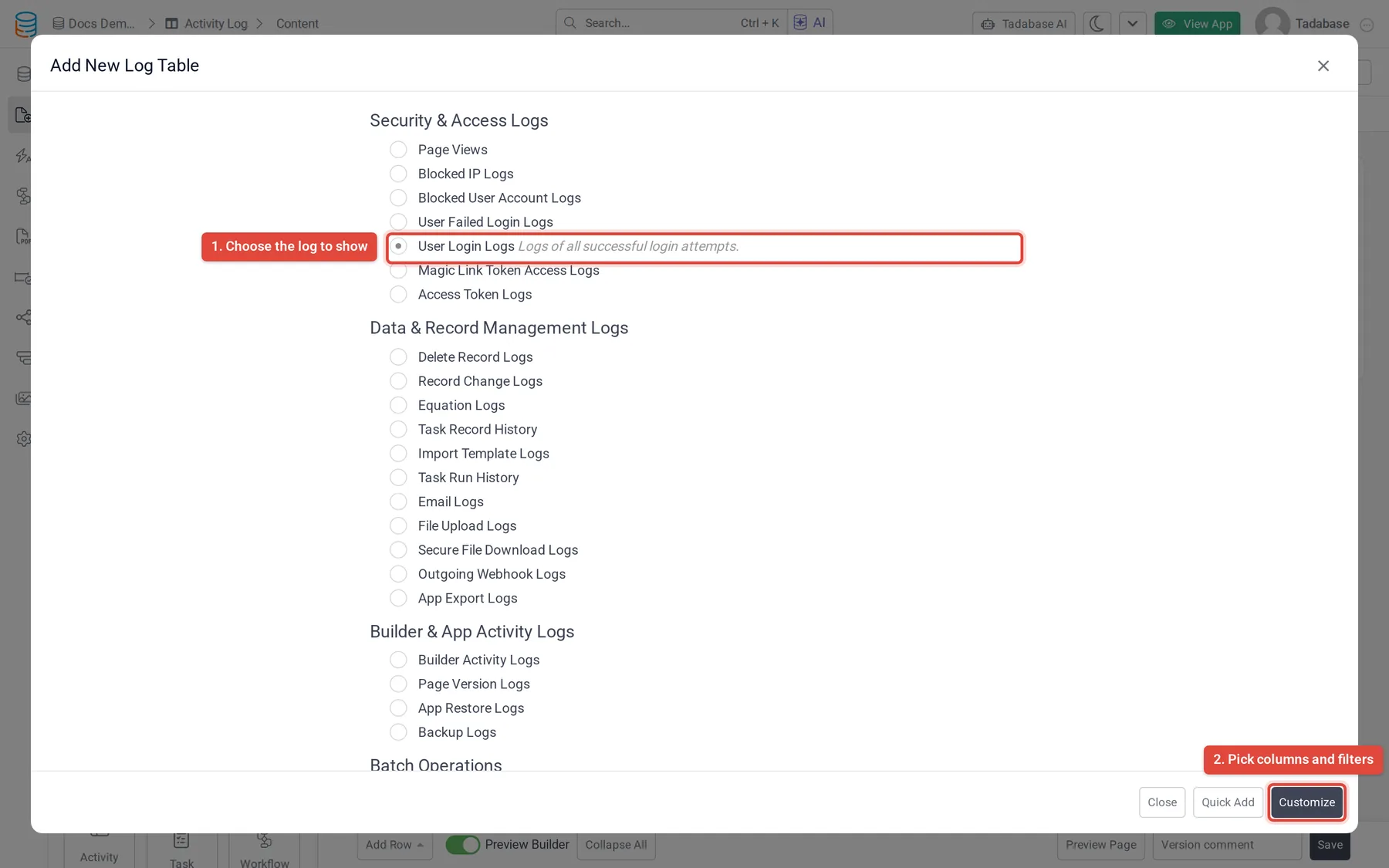
- Add the component Under the data components, drag Log Table into the page, or click Add Component in a column and choose Log Table. The Add New Log Table window opens with the logs grouped by category.
- Choose the log Select the log you want to show. A short description of it appears under its name.
- Continue Click Customize. The table starts with the log's first five columns, which you can change on the Columns tab.
- Set it up and save Use the Data Source, Columns, Options and Design tabs (described below), then click Update & Save.
Log Table is a plan feature. If your plan does not include it, the component shows a red warning icon in the Page Builder with the plan message.
Settings #
| Tab | What you set |
|---|---|
| Data Source > Data Table | Limit Records: All Records, or Limited Records and a number. |
| Data Source > Filters | Which log entries to show. Click Add New Filter Group and add conditions on the log's columns (see the next section). |
| Columns | Click a column under Fields to add it, drag column headings to reorder them and click the bin icon to remove one. You can also set the table's title here. |
| Options | No Records Found Text, Record Limit Per Page (10 to 250, default 10), Pagination (Top, Bottom, Top and Bottom or Hide) and the Record Name shown in the pagination, in Plural and Singular. |
| Design | How the component looks. |
Filter a log to the right entries #
Besides the usual conditions (is, is not, is blank and so on), some log columns have conditions that depend on who is looking and where:
| Column | Condition | Shows |
|---|---|---|
| A column that points to a user, such as App User in Page Views | is logged in user, is not logged in user, is connected to any logged in user's roles | Only the logged-in user's entries, everyone else's, or entries of users who share a role with the logged-in user |
| An IP column, such as IP Address or IP | is the user's IP Address | Only entries from the IP address the user is browsing from |
| Page ID or Page Name in Page Views | is this page | Only views of the page the Log Table is on |
| Data Record ID, on a page that shows one record | is connected with current record | Only entries about the record the page shows, for example its change history |
For example, to let each user see their own login history, add User Login Logs to a page that requires login and filter it to the logged-in user.
Logs you can show #
A log only has entries if the app records it. For example, Record Change Logs needs record change logging on for the table, and User Login Logs needs login logs on in User Settings.
| Category | Logs |
|---|---|
| Security & Access Logs | Page Views, Blocked IP Logs, Blocked User Account Logs, User Failed Login Logs, User Login Logs, Magic Link Token Access Logs, Access Token Logs (users who are logged in now) |
| Data & Record Management Logs | Delete Record Logs, Record Change Logs, Equation Logs, Task Record History, Import Template Logs, Task Run History, Email Logs, File Upload Logs, Secure File Download Logs, Outgoing Webhook Logs, App Export Logs |
| Builder & App Activity Logs | Builder Activity Logs, Page Version Logs, App Restore Logs, Backup Logs |
| Batch Operations | Batch Update, Batch Delete |
Each log's columns are listed under Fields on the Columns tab once you choose it.
Where the same logs are in the builder #
- Logins, failed logins, blocked users and sessions: See logins, failed logins and active sessions.
- Emails: Check whether an email was sent.
- Outgoing webhooks: Check outgoing webhook deliveries.
- Legacy tasks: See when scheduled tasks ran.
Was this page helpful?
Something wrong or missing on this page? Tell us.