
Calculate numbers with a Number Formula
Add, subtract, multiply and divide number fields and fixed values, such as hours times rate, and choose decimals and a currency symbol for the result.
- Verified Nov 17, 2026
- Classic builder
On this page
A Number Formula field calculates a number from other number fields and fixed values with +, -, , / and parentheses. Use it for simple arithmetic such as Hours Rate. For IF logic, rounding functions or other functions, use an Equation instead.
Add a Number Formula field #
In this example the Invoices table, which has Hours and Rate fields, gets a Labor Total field.
- Open the table In the Data Builder, open the Invoices table and click the Fields tab.
- Choose the field type Click Add New Field. Under Equation, click Number Formula, then click Add and Configure.
- Name it Enter a Name, for example
Labor Total. - Add the first field Next to Formula, click Add Field and pick Hours.
- Add an operator Click the
*button. - Add the second field Click Add Field again and pick Rate. The line under the formula now reads
Hours*Rate. - Set the format Choose Decimal Places (for money,
2) and, if you want a symbol, a Currency Type and Format. - Save Click Save. If the formula is not complete, for example it ends with an operator, the builder shows Invalid Formula and does not save it.
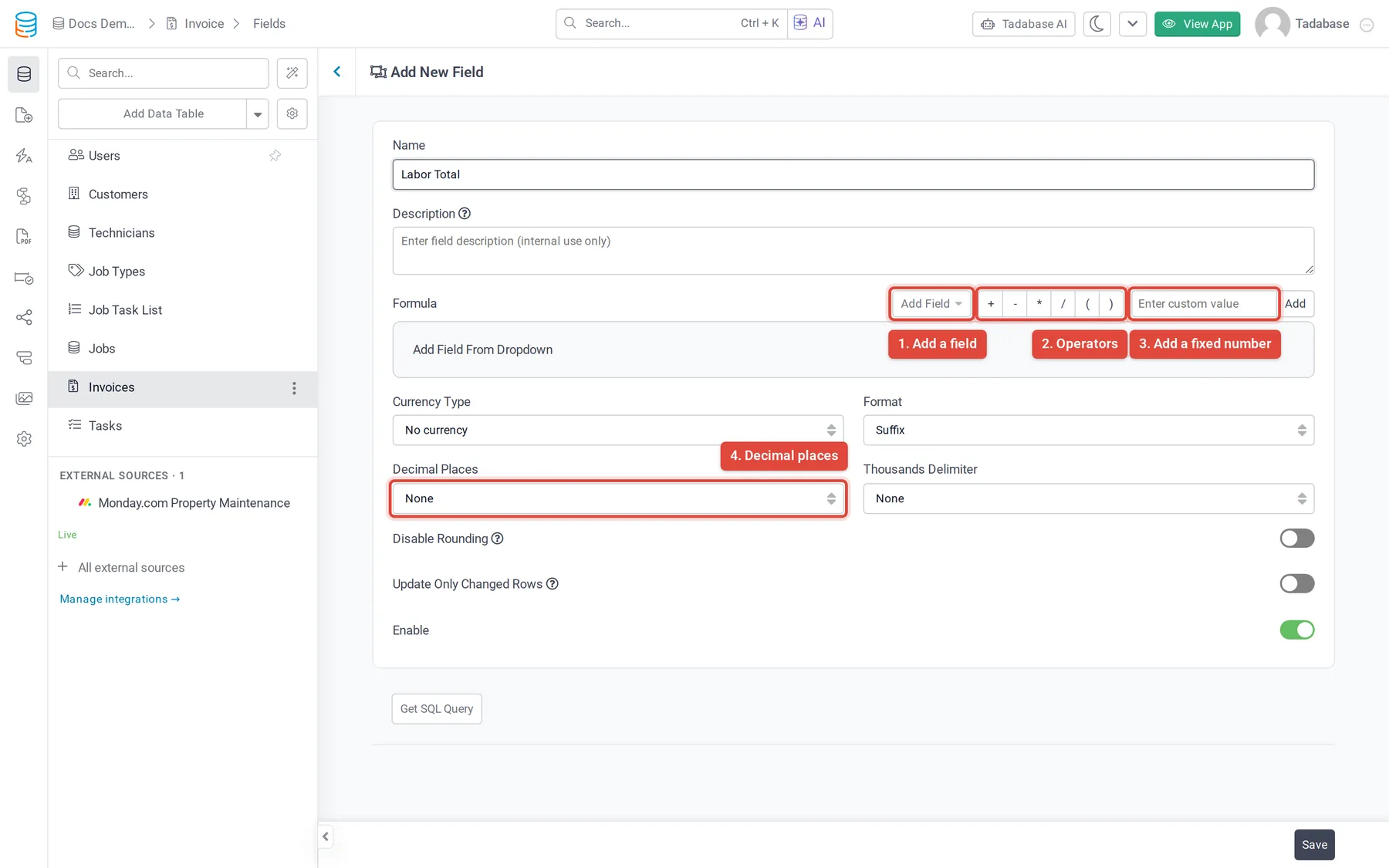
Build the formula #
| Part | How to add it |
|---|---|
| A field | Click Add Field and pick it. Type in Find a field to filter the list. |
| An operator | Click +, -, *, /, ( or ). |
| A fixed number | Type it in Enter custom value and click Add. |
- Drag a part left or right to move it, and click its x to remove it.
- Multiplication and division happen before addition and subtraction. Use parentheses to change the order, for example
(Hours * Rate) + Trip Fee. - An empty field counts as
0.
Fields you can add #
| From | Field types |
|---|---|
| This table | Number, Currency, Slider, Auto Increment, Equation fields whose output is a number, Date Formula fields, and older Count, Maximum, Minimum, Average and Sum fields |
| Connected tables | Number, Currency, Number Formula, and Equation fields whose output is a number |
| Both | Radio, Select, Checkbox and Multi-Select fields that store a number for each option (Score Value) |
A Date Formula field is listed four times, as (in seconds), (in minutes), (in hours) and (in days). Pick the unit you want to calculate with, for example a job's duration in hours times an hourly rate.
Reuse another Number Formula #
A Number Formula cannot use another Number Formula field from the same table. Repeat that formula inside parentheses instead.
For example, if Labor Total is Hours * Rate and you want Invoice Total to add a fixed trip fee of 45, build Invoice Total as ( Hours * Rate ) + 45: click (, add Hours, click *, add Rate, click ), click +, then type 45 in Enter custom value and click Add.
Format the result #
| Setting | Options | Default |
|---|---|---|
| Currency Type | No currency, a currency from the list, or Custom (type your own symbol) | No currency |
| Format | Where the symbol goes: None, Suffix or Prefix | Suffix |
| Decimal Places | None, 0 to 5, or 10 | 0 |
| Thousands Delimiter | None, Comma, Period or Space | None |
| Disable Rounding | On: the full value is kept for storage and other calculations, and the display is cut to Decimal Places instead of rounded | Off |
| Enable | Off: the field stops recalculating when records change; saved values stay as they are | On |
When to use an Equation instead #
- You need IF logic, rounding or other functions.
- You need another Number Formula, a Rollup or a Rating from the same table. An Equation can use them; a Number Formula cannot.
- You need text or dates in the result.
Keep the Number Formula when you need a value from a connected record: an Equation only reads fields of its own table.
Was this page helpful?
Something wrong or missing on this page? Tell us.