
Address field
Store a street address in parts, with suggestions as people type, a Current Location button on forms, a link to Google Maps and map components.
- Verified Nov 17, 2026
- Classic builder
On this page
An Address field stores an address in separate parts, such as street, city and zip. Forms suggest addresses as people type, and tables can link each address to Google Maps.
Options #
| Option | What it does |
|---|---|
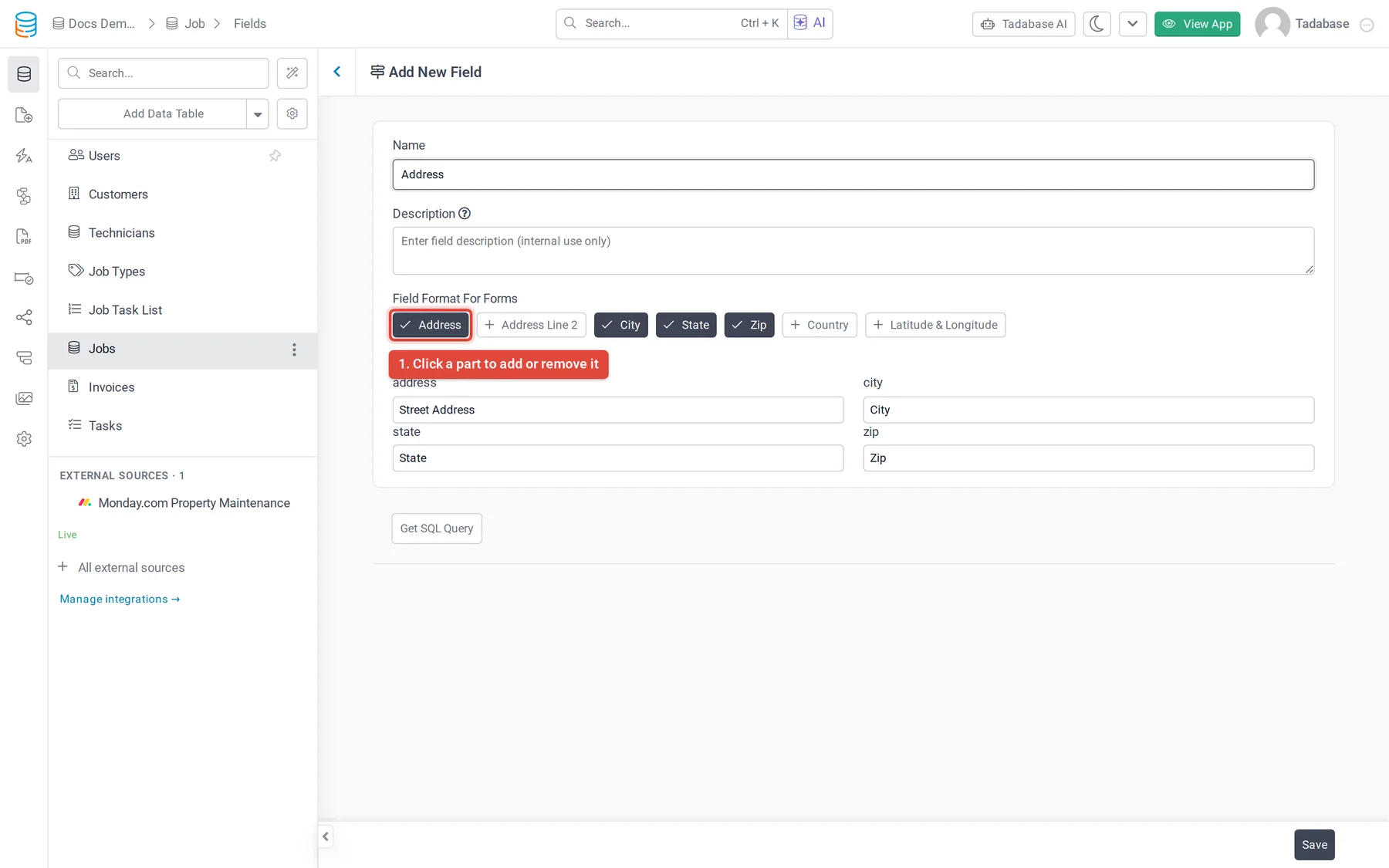
| Field Format For Forms | The parts forms ask for: Address, Address Line 2, City, State, Zip, Country and Latitude & Longitude. New fields start with Address, City, State and Zip. Click a part to add or remove it. |
| Field Labels | Rename the label of each part, for example "Address" to "Street Address". |
| Part | Maximum length |
|---|---|
| Address, Address Line 2 | 300 characters each |
| City | 100 characters |
| State, Country | 50 characters each |
| Zip | 20 characters |
| Latitude, Longitude | 15 characters each |
Address suggestions and Current Location #
In a live-app form, typing in the Address box shows address suggestions from Google Maps. Picking one fills in the other parts.
The field's settings in a form component add these options:
| Option | What it does |
|---|---|
| Get Current Location Button | Adds a Current Location button that fills the address from where the user is. |
| Disable Autofill Latitude-Longitude from Google Map API | Stops the form from filling latitude and longitude from Google Maps. |
| Disable Browser Autofill | Stops the browser from offering saved addresses. |
Address lookups count toward a daily maps usage limit per app. When an app reaches it, lookups stop for the day with the message Daily maps usage limit reached for this app.
Link to Google Maps #
In table and details components, an Address column has the option Link to Google Maps, which is on by default. The address then opens in Google Maps in a new tab.
Show addresses on a map #
The Map components place records on a map by their Address field. See Map component.
Maps depend on your plan. On a plan without maps, the page shows a message that your plan doesn't support maps, and imports don't look up latitude and longitude for Address fields.
Limits #
- An Address field's type can't be changed.
- It has no Default Record Value or Default Form Value.
Was this page helpful?
Something wrong or missing on this page? Tell us.