
Choose between PDF Pages and PDF Forms
PDF Pages build a PDF from components you lay out; PDF Forms fill a PDF file you upload. Compare the two and find them in the builder.
- Verified Nov 17, 2026
- Classic builder
Tadabase makes PDFs from your records in two ways. A PDF Page is a document you build from components, the way you build an app page. A PDF Form is a PDF file you upload, such as an existing contract or government form, with placeholders that are filled with record values.
Compare PDF Pages and PDF Forms #
| PDF Pages | PDF Forms | |
|---|---|---|
| Starts from | An empty page you fill with components: Table, List, Details, Card, HTML, Image and Page Break | A PDF file you upload |
| Look and layout | A PDF layout sets the paper size, orientation, margins, header and footer; a theme or your own CSS sets the styling | The uploaded file's design stays as it is; you place Text, Checkbox, Image and Signature placeholders on it |
| Records | A List PDF shows many records; a Detail PDF shows one record and its connected records | Each filled PDF uses the values you map for one run |
| How people get it | A PDF Print button on a page, a Connected PDF link in a table or list, a form email attachment, or the Create PDF Page workflow action | The Create PDF Form workflow action, or Test fill in the builder |
| Plan setting | PDF Pages, with a limit on how many you can create | PDF Forms, with a limit on how many you can create |
- Choose a PDF Form when the layout already exists as a PDF and must not change, for example a tax form or a signed agreement template.
- Choose a PDF Page when you want to design the document yourself, list many records in one PDF, or show a record together with its connected records.
Find PDFs in the builder #
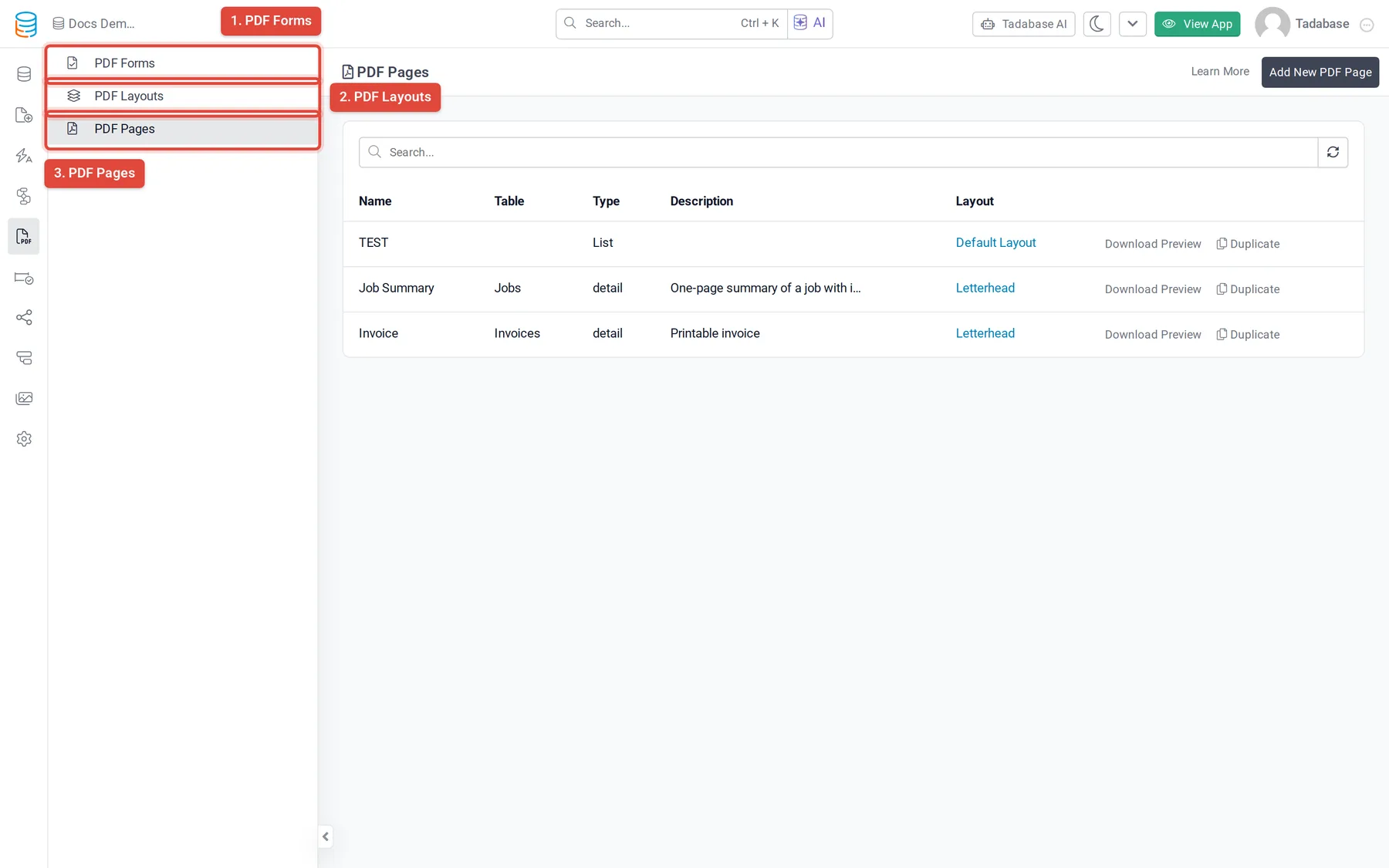
- Open the PDF menu In the builder's left bar, click the PDF icon (its tooltip says PDF).
- Pick what to work on The menu lists PDF Forms, PDF Layouts and PDF Pages. PDF Layouts hold the paper size, margins, header and footer that PDF Pages use.
Plans and limits #
PDF Pages and PDF Forms are plan features, and each plan sets how many of each you can create. If your plan does not include one, its item in the PDF menu is greyed out with an upgrade icon. When you reach your plan's number of PDF Pages, the Add New PDF Page button is replaced by an upgrade button. See Plans.
PDF Layouts follow the PDF Pages setting, because layouts are only used by PDF Pages.
Next steps #
Was this page helpful?
Something wrong or missing on this page? Tell us.